Author: Inscribe

  • How to do Multilingual SEO for Content Localization

    How to do Multilingual SEO for Content Localization

    Today, many businesses are breaking into international markets to reach more customers.

    However, the question remains – how do businesses sell to customers with different languages and cultural backgrounds? How do you optimize your website to rank in other countries as well?

    The answer lies in multilingual SEO.

    This can be overwhelming, so in this article, we’ll show you how to do multilingual SEO effectively. You’re not alone on this.

    Let’s dive in.

    A Brief Overview of Content Localization

    Content localization is the process of targeting a particular audience by modifying existing content and user experience to fit the audience’s language and cultural preferences.

    However, content localization goes beyond mere translation to other languages. It includes optimizing content for local searches as well, and this is where multilingual SEO comes in. 

    What Is Multilingual SEO?

    Multilingual SEO is the art of optimizing multi-language (localized) content for search engines. It involves using SEO best practices that align with the target region of the content.

    You don’t want to confuse Google and other search engine bots that are trying to rank you, do you?

    Why?

    Because the people you’re trying to target are most likely to search on Google using their native language. For example, if you’re trying to target Spanish folks, it’s best your content is written in Spanish.

    You get the picture?

    Not to worry though, multilingual SEO is just like regular SEO. The only difference is that you have to optimize your content for different languages. 

    With that said, let’s discuss how to do multilingual SEO.

    How to do Multilingual SEO for Content Localization

    Here’s how you can break into international markets with content localization and multilingual SEO. 

    1. Conduct In-Depth Keyword Research for Each Target Market

    This is the first and most crucial step in an SEO-conscious localization process. Find keywords your target audience is using to find businesses like yours. 

    Powerful tools like Semrush, Ahrefs, and Google’s Keyword Planner will help you narrow your keyword research to specific countries. And when you find the top keywords for each country, you’ll be able to optimize your localized content to rank in the appropriate region. 

    Pro tip: If you are targeting 3 different regions, ensure you separate the keywords for each area. Don’t mix the top keywords trending in the United States with the ones for Canada or Australia. 

    2. Dig Into Cultural Nuances

    What works in one country may not work in another, even if they seem similar. You have to dig deeper to understand the cultural nuances of your target regions. 

    For instance, what Americans popularly call “French fries” or “fries” is what the British know as “Chips.” And what the French-speaking people call “café” is what English speakers refer to as “coffee shop.”

    This makes it crucial to dig into the language and culture of your target audience when localizing your content – and it affects SEO too. You shouldn’t be optimizing for the keyword “coffee shop” when your target audience is searching for “café.” 

    3. Work With Language Experts and Translators

    Automated translation tools have improved over the years, especially those with advanced Artificial Intelligence.

    However, they are still no match for the accuracy and cultural awareness of expert human translators. So even if you use a translation tool, ensure you hire an expert translator to check for errors and cultural appropriateness. 

    4. Translate All Metadata and Alt Text

    Just because metadata and Alt text are hidden doesn’t mean you should ignore them. Paying attention to this tiny detail can make your localized content shoot to the first page of local searches in the target regions. 

    5. Implement the Hreflang HTML Tags

    Don’t let the name scare you. It’s nothing complicated at all.

    Hreflang HTML tags are just simple tags embedded inside website pages to tell search engines that different versions are available for specific regions. 

    See an example in the image below.
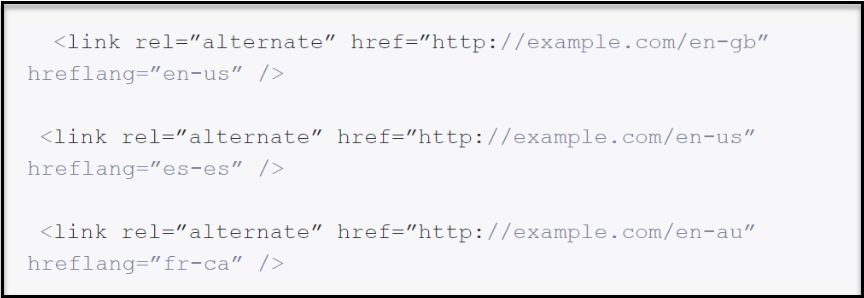
    How to do multilingual seo

    Image source: Lokalise

    In the image above, the Hreflang HTML tags specify that the website “example.com” has French-Canadian, Spain-Spanish, and American-English versions. 

    After localization, adding such tags to your website will tell search bots what to do, and help others find your website easily – bringing you significant organic traffic in the long run.

    6. Build High-Quality Local Backlinks

    Search engines like Google would take longer to rank your localized content if no trusted websites are linking back to your website. 

    These “trusted” websites are usually popular news outlets, public forums, government-owned websites, or any reputable local website in a target region. 

    You would need to conduct outreach campaigns to connect with these reputable local websites.

    A good idea is to write an article about a new trend in the local region and pitch that to a reputable news website. But somewhere inside the article you pitch, ensure you include a link pointing back to your localized website. Preferably a do-follow link.

    This way, search engines understand that reputable local websites find your content relevant.

    7. Optimize for Speed and Responsiveness

    We live in an era where our attention span is barely 8 seconds.

    No one would enjoy browsing through a slow and unresponsive website even if it’s displayed in their language and optimized for SEO. That’s why you should check your website’s speed, especially after implementing localization.

    And don’t forget to also check the responsiveness of your localized website on both desktop and mobile devices. Is the website displaying nicely on mobile? Are all the buttons working after localization?

    For example, you don’t want to discover that your website’s “Checkout” button isn’t working on mobile devices. So, ensure you check for these issues and address them if they happen.

    Pro Tip

    Consider implementing region-specific URLs

    Something like “www.mysweetshop.fr” for France and “www.mysweetshop.co.uk” for the U.K. It’s obvious that both websites belong to the same company, “MySweetShop,” but the URL extensions are unique for different regions. 

    This method works well for localizing different versions of a website. Plus, search engines will easily rank websites with region-specific URLs for local searches in a specific region.

    In Conclusion

    If you can implement these tips, your journey into international markets will be easier. Within a few months, your business can start ranking in your specific target regions. And when that happens, your customers will increase as well.

    So, dear reader, let these tips guide your multilingual SEO process.

    Goodluck!

  • Mobile SEO 101: How To Optimize Your SEO Strategy for Mobile Users

    Mobile SEO 101: How To Optimize Your SEO Strategy for Mobile Users

    So you have an SEO-optimized website that looks gorgeous on laptops and desktops?

    Good job.

    But does the website work well on mobile devices?

    Google uses mobile-first indexing, meaning Google predominantly uses the mobile version of a site’s content for indexing and ranking. So, if your SEO strategy doesn’t cater to mobile users, your website may not even smell ranking. 

    The good news is that you can fix this.

    In this article, we’ll discuss mobile SEO and show you how to optimize your SEO strategy for mobile users. 

    To Start With…What Is Mobile SEO?

    Mobile SEO is the process of making the mobile version of your website – rank higher in search engines. This includes making your website easy to view, navigate, and use on smaller devices like smartphones and tablets. 

    And more importantly, the process requires making the mobile version of your website accessible to search engine crawlers. These spiders (or crawlers) are responsible for analyzing your website, indexing the content, and ranking the site on mobile search result pages.

    In this era where more people use smartphones than desktops, every website owner must consider mobile SEO. 

    Here are some stats showing the growing trend in mobile device usage worldwide. 

    • Mobile usage makes up 53.59% of the global market share when comparing desktop to mobile and tablet devices.
    • A recent study shows that the average person spends 3 hours and 15 minutes on their phone daily.
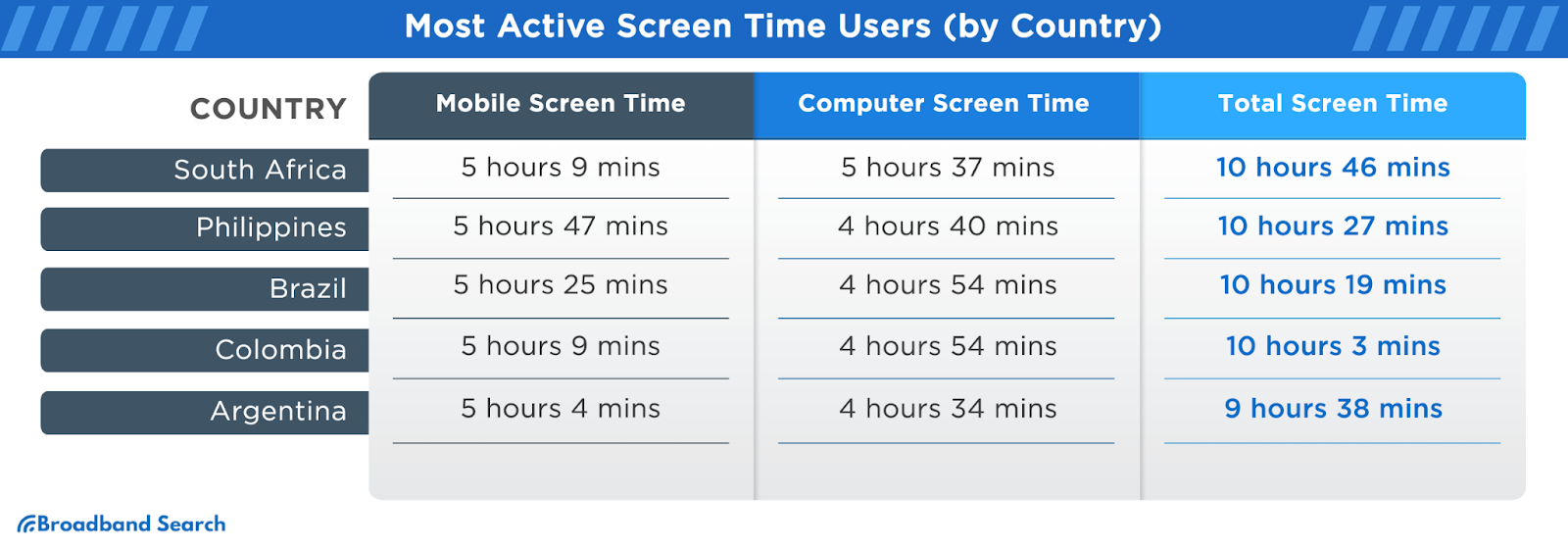
    • A recent article by Broadband Search reveals that 98% of Gen Z (people born after 1997) spend over 4 hours daily on mobile devices.  

    Mobile SEO

    Image source: Broadband Search

    With that established, let’s discuss how to cater to mobile users in your SEO strategy. 

    9 Ways To Optimize Your SEO Strategy for Mobile Users

    Mobile SEO is not difficult.

    You only need to do a few things to complement your existing SEO efforts, some of which include:

    1. Allow Bots To Crawl Everything Necessary

    Depending on the platform you use, check the Admin side of your website to access a “robots.txt” file.

    This file specifies which pages and content you don’t want search engines to crawl or index. (i.e., blocked from the public)

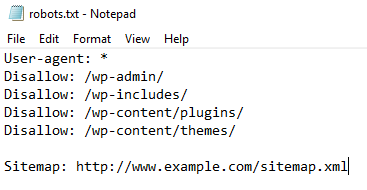
    See an example here:

    Mobile SEO Robots-txt

    It’s fine if your site’s Robot.txt file has instructions to block out the Admin page, customer images folder, etc.

    However, ensure your blog or articles section isn’t blocked. If it is, crawl bots won’t be able to crawl your blogs and rank your website in SERPs (Search engine results pages). 

    2. Use a Responsive Mobile Design

    A website with a responsive design should work well across all platforms, including laptops, tablets, and smartphones. You don’t want a website that only works on desktop and is horrible on mobile.

    Most popular website builders often have responsive designs coded into their templates. However, if your website isn’t functional on mobile, talk to your web designer.

    P.S: If your website uses responsive design, Google recommends setting up a particular tag called “viewport meta tag.”

    This tag helps to change the size of your website pages to fit each user’s device. 

    Whether your website already has the tag or not, Google recommends writing the tag this way: <meta name=viewport content=”width=device-width, initial-scale=1”>

    And if you need a tool for testing the responsiveness of your website, check out this one here.

    3. Reduce Popups

    Ever had popups blocking your view while trying to read something online?

    Yeah, it’s annoying.

    While it’s less intrusive on desktops or laptops with big screens, popups can be a big turnoff on mobile devices. Even worse, Google once rolled out an update against “intrusive” popups.

    So, tone down your popups for the sake of mobile users and to get better SEO rankings. 

    4. Optimize Titles and Description Tags for Mobile

    When posting blog content on your website, you’ll need to provide a title and a description. Especially if you use WordPress to manage your website, and you have Yoast SEO installed, you have to provide meta descriptions for every article. 

    The general rule of thumb is to keep the descriptions and the titles relatively short.

    However, here are the character limits that Google recommends:

    • For Mobile: The title should be approximately 78 characters, while the description should be 155.
    • For Desktop: The title should be approximately 70 characters, while the description should be 155.

    While Google gives more characters to the Title tags on mobile, don’t let that trick you into writing longer titles. If your titles are too long, search engines may not rank them easily, or show snippets.

    5. Show Content at Once to Mobile Users

    Google and other search engines can’t crawl content that requires an action before being displayed fully.

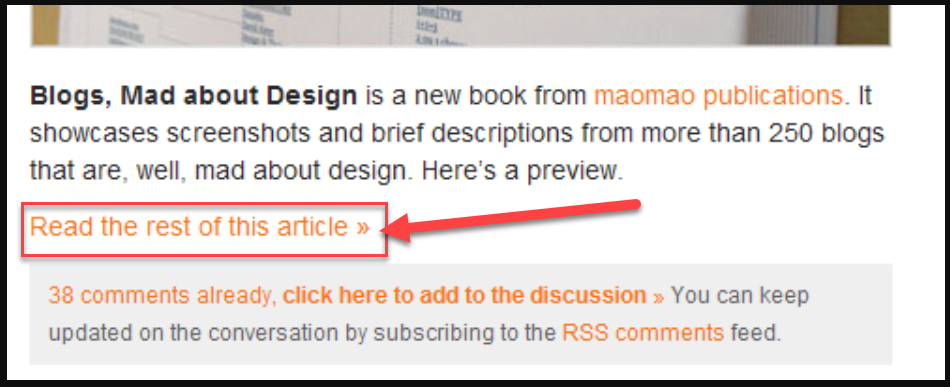
    Here’s an example of a webpage requiring visitors to click the “Read the rest of this article” before seeing the full content.

    How not to do mobile SEO

    Image source: Smashingmagazine

    This practice doesn’t help your SEO rankings, because search engine crawl bots would think such a webpage lacks content and they’ll abandon it. 

    6. Use Smaller Header Images 

    This is a user-experience hack for tidying things on desktop and mobile.

    Image source: Nicepage

    The above header image looks beautiful on desktop devices. But it can be an issue on mobile. Such a large image will shrink or become warped when viewed on mobile. 

    This is why you should use a smaller header image that displays clearly on mobile and desktop devices. 

    7. Make Your Content Easy To Read on Mobile

    No one wants to pinch and zoom in on different parts of your website to get valuable information. So, ensure that the font of your website content is well-optimized for mobile users.

    In fact, recent studies say that the average human attention span is 8.25 seconds. This means more people are likely to leave your website abruptly – if they encounter the smallest difficulty navigating your website. 

    You can significantly reduce your website’s bounce rate by making your content easy to read on mobile.

    8. Put Social Share Buttons in a Tab Bar

    Social share buttons make it easy for people on your website to share your content directly to Twitter, Facebook, Instagram, and other social media channels. 

    However, the screen estate on mobile is small; hence, there’s hardly any room for putting animated social share buttons. A smooth way to add these buttons is by putting them in a tab bar that doesn’t hinder a mobile user’s experience. 

    If your social share buttons are non-intrusive, more people will share your content on mobile, which in turn, improves your SEO ranking.

    9. Optimize Your Page Speed on Mobile

    Google recommends making your website load in under a second, which is a major SEO factor when ranking any website.

    You can use the Google PageSpeed Insights tool to check your website’s loading speed on mobile. The tool will also provide recommendations to improve your website’s speed.

    Here’s a scan result from the Google PageSpeed Insights tool.


    Now, once you’re done optimizing your website for mobile SEO, you should also check if the website is mobile-friendly.  

    How To Check if Your Website Is Mobile-Friendly

    We’ll recommend two methods to check if your website works well on mobile.

    1. Check Manually on a Device

    This is the best method, as it entails checking your website on an actual smartphone. Input the website’s URL on a mobile device browser and check for the following:

    • How fast do the pages load?
    • What functionality works fine?
    • How easy is it to read the content on mobile?
    • Are there disruptive popups that should be removed?

    2. Use Google’s Mobile Usability Tool

    The Mobile Usability tool is a cool feature on Google Search Console, and it helps you examine if your website is usable on mobile.  

    Here’s how you can use the Mobile Usability tool in 2 simple steps.

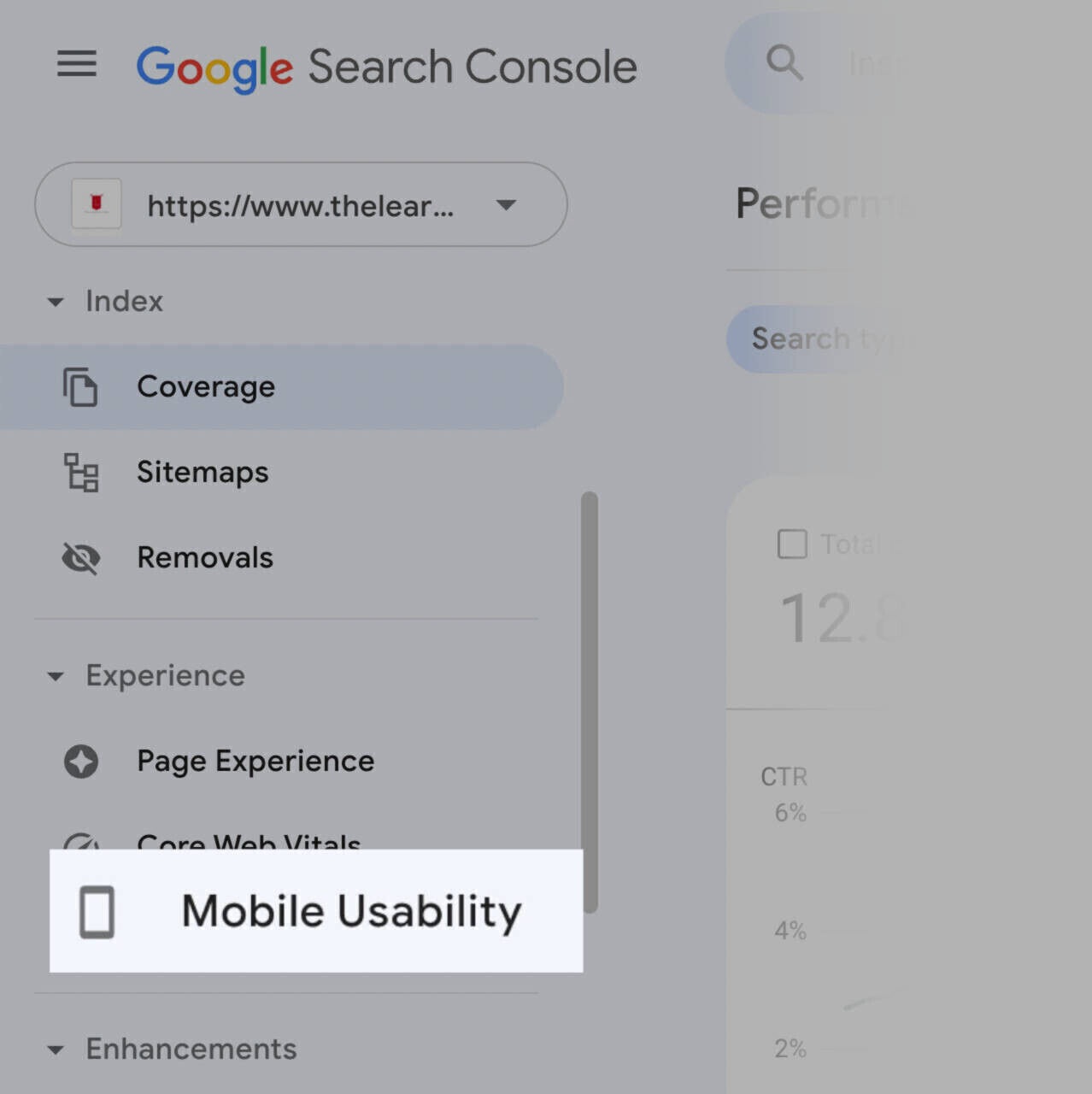
    • Log into your Google Search Console and click the “Mobile Usability” option on the left menu.

    Google's Mobile Usability tool

    Image source: Semrush

    • Check the information provided on the report screen. It should tell you what to fix and how many pages are affected. See the example below.

    Conclusion on Optimizing for Mobile SEO

    The best strategies for mobile SEO include crafting mobile-friendly content, optimizing for voice search, and using structured data.

    In addition, ensure that the loading time of your website on mobile isn’t an eternity. Optimize your title tags and meta descriptions for SERPs on mobile. 

    If you can tweak your mobile SEO strategy using these simple tips, you’ll see a significant spike in your search engine rankings. 

  • Spotlight: An Explicit Look Into How Fresha Penetrates 6 Countries

    Spotlight: An Explicit Look Into How Fresha Penetrates 6 Countries

    Sometimes, the perfect recipe for success is to embrace simplicity and offer great value for money. 

    This is what Fresha embodies and has been using to generate massive revenue in the beauty and wellness industry.

    The company offers a simple, flexible, and powerful booking software for Salons and Spas worldwide. 

    That seems like all, yeah?

    Not quite.

    Behind the scenes, Fresha uses several strategies to achieve global success. And in this article, we’ll divulge all the details about how Fresha penetrates major countries across the globe.

    You ready?

    But First…A Brief Overview 

    Fresha is a U.K.-based company formerly known as Shedul. The company was founded in 2014 by Nicholas Miller and William Zeqiri.

    With headquarters in London, Fresha serves thousands of customers worldwide, and is recognized as a leading software in the beauty and wellness industry. The platform provides a place to discover, book, and pay for beauty appointments with local providers. 

    It’s a simple and effective software solution for local salons, barbershops, and spas in any part of the world. 

    Now, speaking of serving the whole world, let’s discuss how Fresha serves customers globally.

    How Fresha Penetrates 6+ Countries and Serves Local Businesses Worldwide

    While other companies rely on paid advertisement, Fresha combines many effective strategies to penetrate different countries organically.

    Here are the top five strategies Fresha uses:

    1. Subscription-Free Offering

    Unbelievable, right? We know.

    Booking and managing appointments is free on Fresha, and it’s also free for businesses as well.

    But then, how does Fresha make money?

    The company charges a 20% new client fee on the first appointment you get from a client who finds your business via Fresha’s marketplace. And after the first appointment, it’s free forever.

    However, there’s a 2.19% payment processing fee and a $0.20 charge on every card transaction. Meaning, for clients that find you through the marketplace – and pay through the app as well, Fresha takes a cut.

    You gerrit?

    Which means…Fresha only makes money when you make money. 

    So if your business hits the low, you won’t sink in subscription fees or other hidden charges. This is why many small businesses in 6+ countries prefer this scheduling platform to others.

    2. Localized Website Content

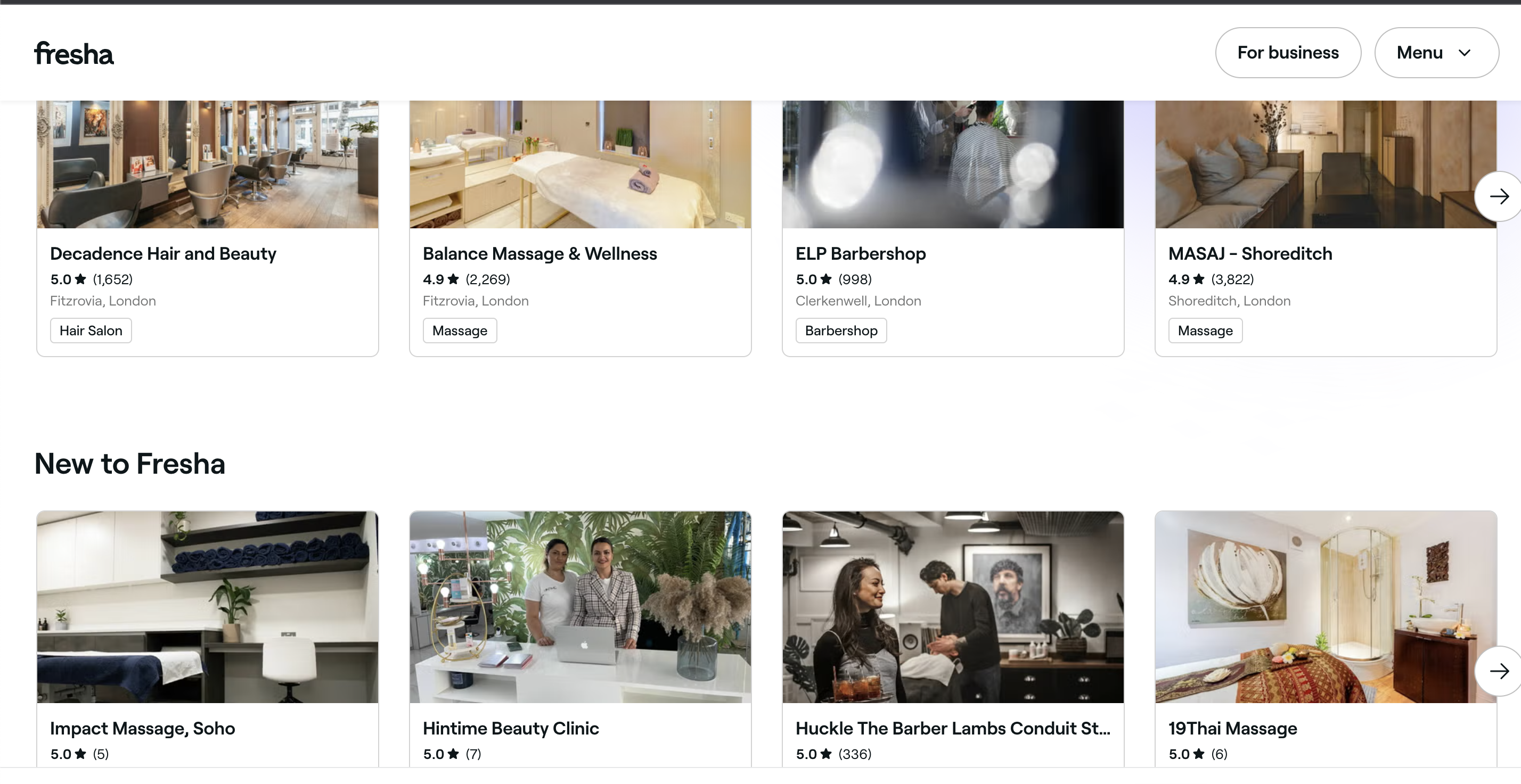
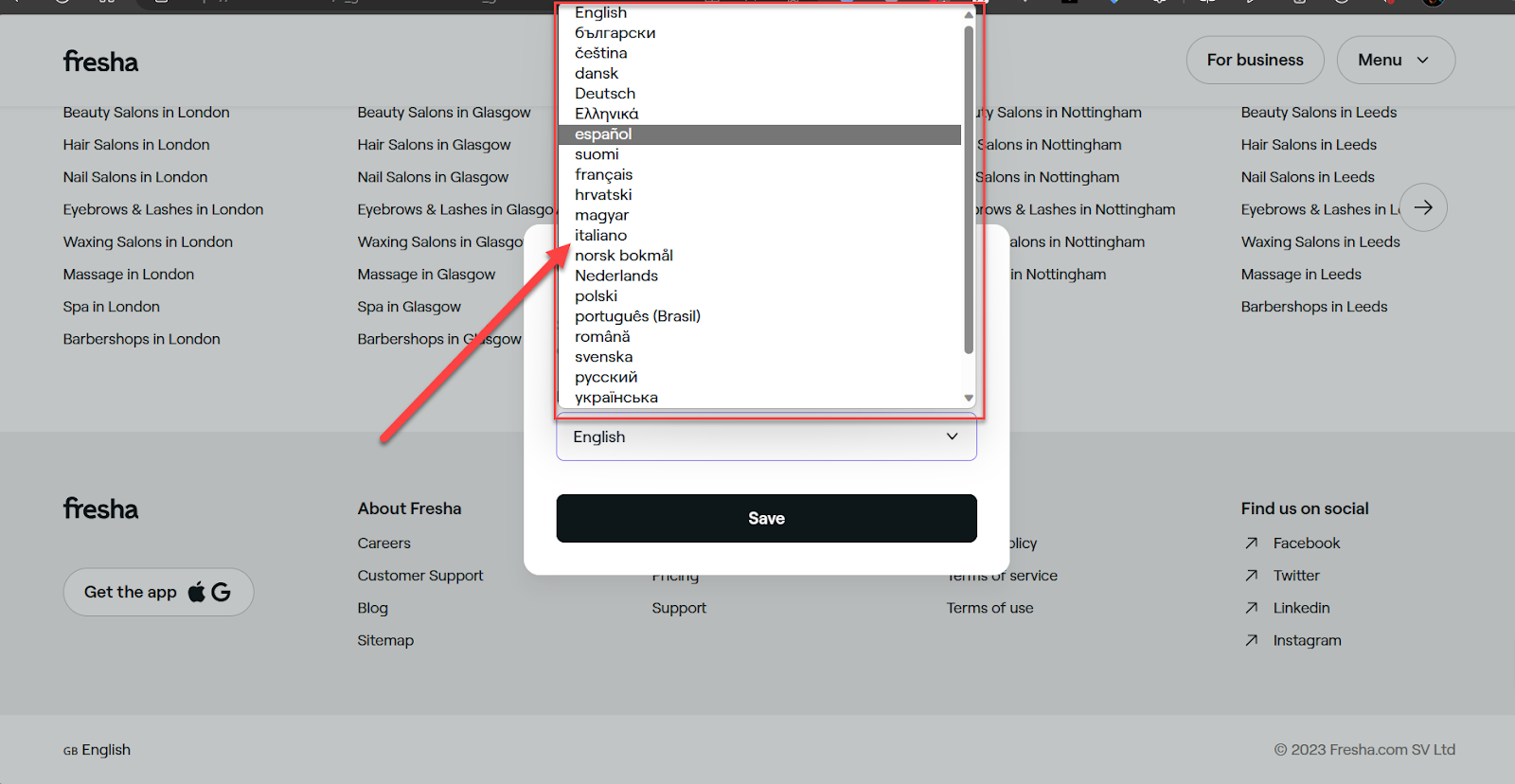
    Fresha’s official website provides a language-selector button at the bottom of each page. This button allows every visitor to view the company’s website in their native language.

    See the screenshots below.

    When you click the button, a language-selection screen pops up as seen below.

    Fresha's selection screen

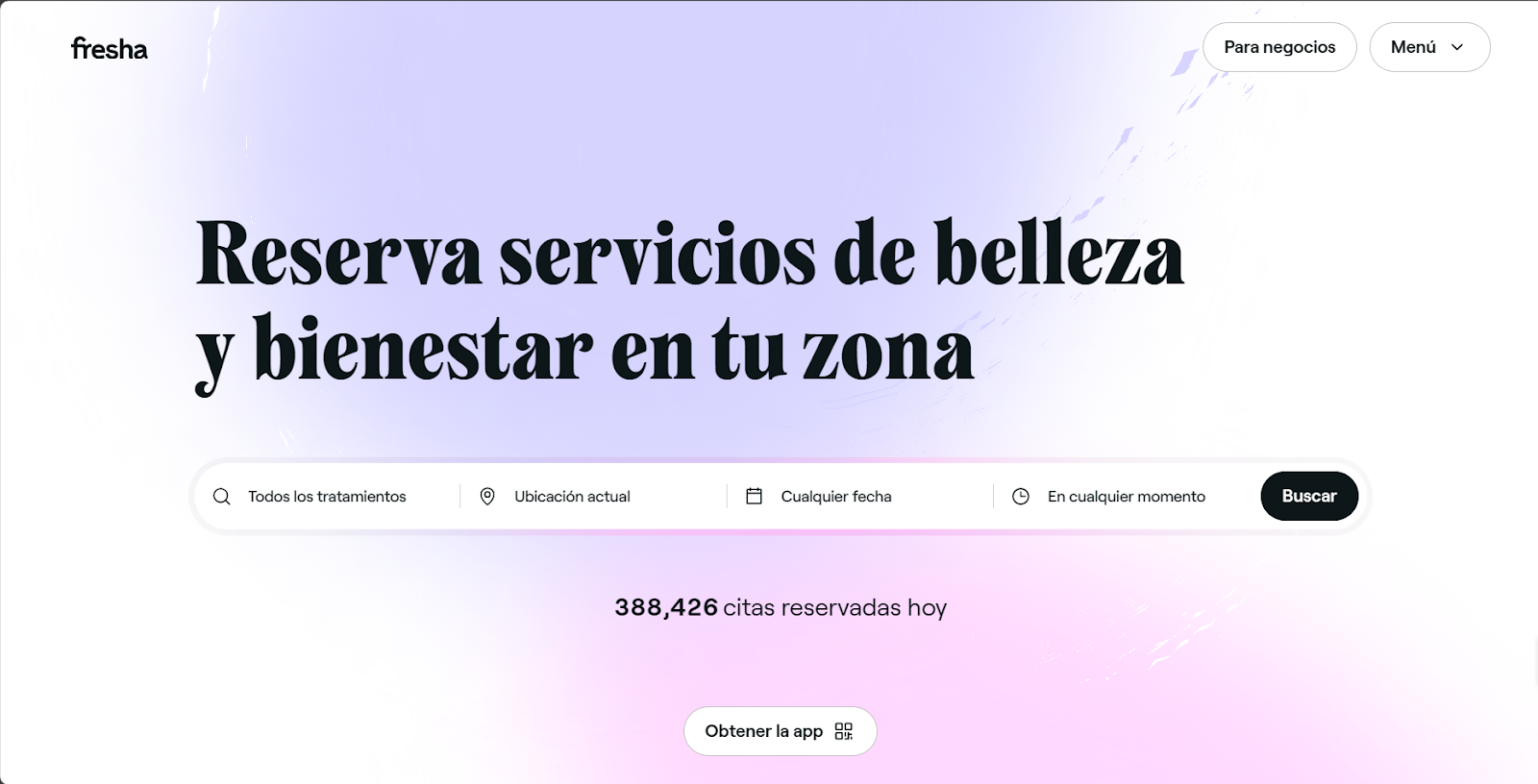
    And here’s what it looks like after switching to Espanol.

    Fresha

    3. Localized Payments

    Despite being a U.K.-based company, Fresha allows payments to be processed in local currencies within its platform. 

    Here’s an example of payment information showing the United Arab Emirates dirham for a Dubai-based salon.

    Image source: Thesalonbusiness

    Fresha also provides card terminals for processing local payments in your saloon or spa. Such card transactions attract 2.19% plus a $0.20 equivalent charge on every payment. 

    4. Continuous Partnership With Local Businesses

    Every business owner who registers on Fresha is referred to as a partner.

    But it doesn’t stop there.

    Fresha frequently interviews these local business owners and posts the videos on Instagram, Facebook, LinkedIn, Twitter, and YouTube. This spotlight approach makes business owners happy and builds a true sense of partnership. Posting the interview videos online also gives more credibility to their individual brands. 

    Screenshot showing recent interviews with business owners

    It’s also worth mentioning that Fresha has a marketplace where you can list your business and get found by new customers. So, despite having clients located in different countries, Fresha is still able to connect with them meaningfully. 

    5. Transparency and Excellent Customer Support

    Fresha is one brand that keeps simplicity and transparency at the center of all it does. The company states clearly on its website what to expect in its free-forever software plan.

    When it comes to customer support, Fresha often replies within minutes to email complaints and inquiries. The company also has a brilliantly-managed and active Help Center.

    The Help Center has a part called “Feature ideas,” which allows users to vote for a new feature they want added to the platform. Or recommend tips that can improve the company’s software. 

    What You Can Learn From Fresha’s Strategies

    Fresha’s business strategies are worth emulating, and here are some suggestions you can implement in your business.

    • Find a way to offer free features and resources that help people get a “taste” or “feel” of your products and services.
    • Get your website’s content localized to fit the languages, cultures, and tastes of people in other regions.
    • Integrate support for local payment methods and currencies in your business platforms.
    • Offer excellent customer support for customers in different target regions.

    FAQs

    Who Is Fresha For?

    This platform is a great option for budget-minded stylists and salons. 

    It’s free to use, and there’s no steep learning curve. You can just start using it right away. Additionally, your salon will benefit from visibility on the Fresha marketplace.

    Is Fresha No Longer Free?

    The plans are free to use. However, users pay a 20% one-time commission for every new booking made via the Fresha marketplace.

    Meanwhile, payment processing and marketing messages are also optional paid extras.

    What Countries Is Fresha Available In?

    Fresha is currently available in 120+ countries, serving 100,000+ partner businesses and supporting 450,000+ stylists and professionals. 

    Additionally, card terminals are accessible in Canada, Australia, Austria,  France, Germany, Belgium, Croatia, Czech Republic, Finland, Greece, Ireland, Italy, Lithuania, Luxembourg, Netherlands, Poland, Portugal, Spain, Switzerland, the United Kingdom, and the United States.

    What Next?

    Apply all you’ve learned about Fresha’s strategies to your business. 

    The company keeps expanding globally by offering free resources, partnering with local businesses, and providing localized content and payment options. 

    These strategies might seem daunting, but Fresha has shown us that they work really well for penetrating various countries worldwide. 

    It’s your turn now. Apply these strategies to get your brand on the global map. 

    Goodluck!

  • How to Use an eCommerce Blog to Drive More Customers

    How to Use an eCommerce Blog to Drive More Customers

    Building a successful eCommerce brand from the ground up is no small feat.

    You need a good product and a functional online store. And if you’re lucky enough, find a good company to handle shipping without disappointments.

    However, after all that work comes another challenge — expanding visibility to reach more customers. 

    That’s where an eCommerce blog can help you out.

    This article explains everything about creating a blog for your e-commerce brand, and how you can drive customers with it. So let’s dive in. 

    Having an eCommerce Blog: Is It Necessary?

    A blog is a section on your website where you publish quality content to educate your audience and build trust. 

    It’s a platform for sharing product comparisons, expert opinion posts, and comprehensive guides on how to use your products. And the good thing about having a blog is that — the content attracts organic traffic from search engines like Google.

    Here’s all the good stuff you can gain from having a blog for your eCommerce brand:

    1. More Revenue

    The more people visit your e-commerce website, the higher your chances of getting more sales.

    When you constantly publish quality content on your blog, Google shows your website to more people. And when that happens, your website will attract more visitors and sales, which ultimately increases your revenue.

    2. Added Value At No Cost

    Blogging is an easy way to add more value to your customers — at almost zero cost.

    You can leverage your e-commerce blog to publish:

    • in-depth product reviews
    • helpful guides that address common complaints
    • and product comparison articles to educate your audience

    Such content can convince your target audience to become paying customers.

    3. Become an Authority

    Your blog is an excellent platform to showcase your expertise on subject matters around what you sell. It’s a perfect place to give your expert opinion on trending topics about your products. 

    So, if you see any trending topic you want to blog about, don’t hesitate.

    Driving Customers With an eCommerce Blog: 5 Key Steps

    Now that we’ve discussed what you stand to gain from an eCommerce blog, let’s dive into the how.

    Step #1: Add a Blog Section to Your Website

    Check the backend of your current e-commerce website and find the option to add a blog. 

    The steps vary from platform to platform, but most e-commerce platforms have a straightforward guide for adding a blog section

    If you are contemplating good e-commerce platforms with seamless blogging functionalities, check out Shopify, WooCommerce, Magento, BigCommerce, or 3DCart.

    Regardless of your e-commerce platform, each blog post must have a title, short description, and main content. We’ll discuss this in more detail at step 4 (SEO checklist).

    Step #2: Conduct Keyword Research

    This critical step helps you know the type of blog content to create.

    A good way to begin your SEO keyword research is by analyzing the top competitors ranking for the products you sell. For example, if you sell pet accessories, go to Google and punch in a critical keyword like “buy pet accessories.” 

    You will see something like this:

    Scan through the Google search results page to see stores already ranking for that keyword. Input the URL of these websites into tools like Ahrefs, Semrush, or other SEO tools.

    By doing this, you’ll identify the organic keywords that make your competitors rank high on Google. However, ensure you only pick the keywords relevant to your products. 

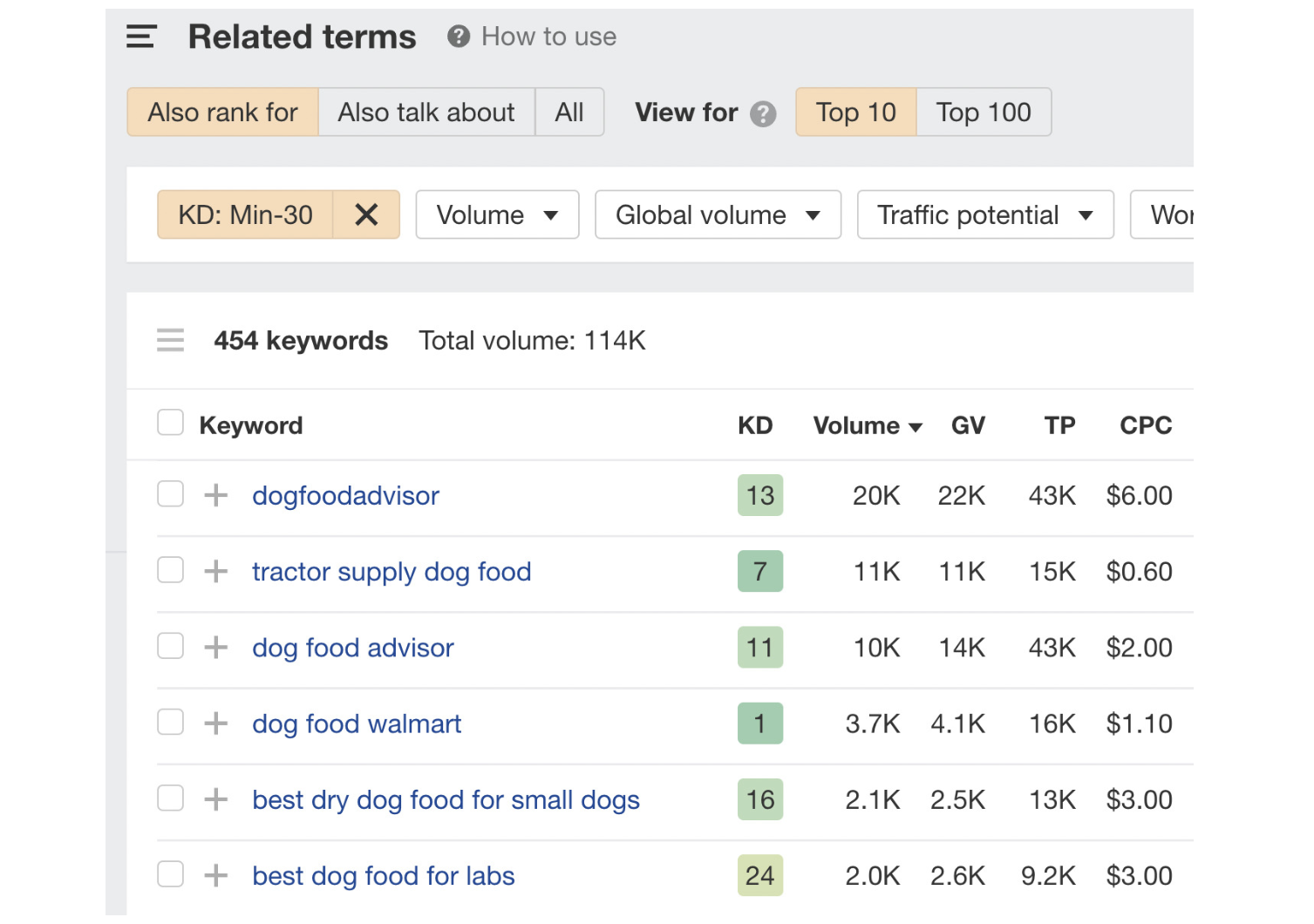
    Check out this screenshot.

    ecommerce blog keyword research

    Image source: Ahrefs

    Assuming you sell dog food, the keyword “dog food walmart” in the above screenshot shouldn’t be your concern at all.

    Focus on relevant keywords like “best dry dog food for small dogs.” 

    Step #3: Create a Content Strategy and Calendar

    After selecting your relevant keywords in Step 2 above, proceed to categorize them, as this will help you create an effective content strategy.

    To see this into action, let’s create a content strategy and calendar for a dog supplies store.

    1. Group Your Keywords

    Put all the keywords relating to dog food in one category and others relating to dog accessories in another category. 

    2. Create a Content Strategy

    Handpick the most relevant keywords from each category. For the dog food category, you can select a keyword like “dog food for small dogs.And for the dog accessories category, you can select “designer dog collars.” 

    The next step is to write detailed blog posts around these relevant keywords and publish them on your e-commerce blog. There’s no limit to how many relevant keywords you can write about. 

    For example, 

    • puppy food for sensitive stomach”, 
    • best food for little dogs
    • designer puppy collars

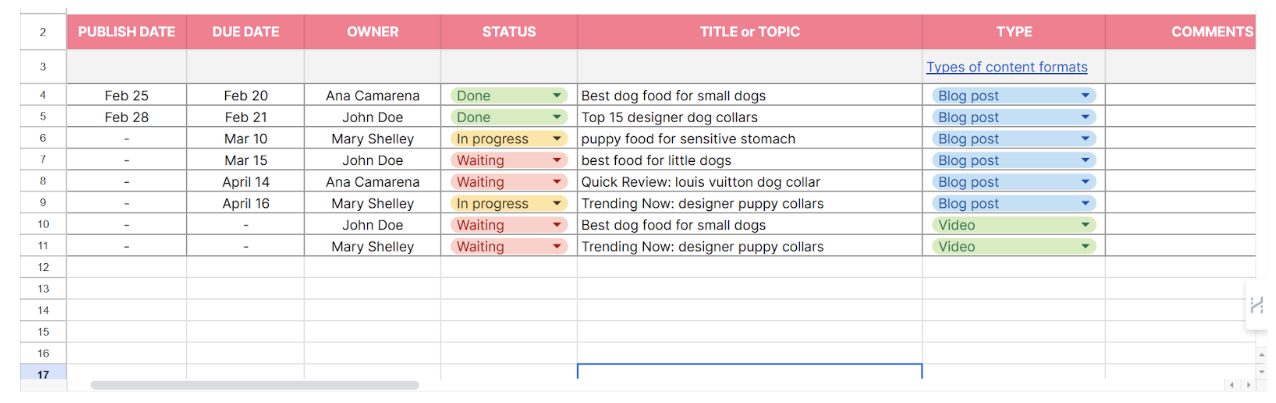
    The last part of your content strategy is to draft a posting schedule — known as a content calendar. This will determine the time and frequency you post on your e-commerce blog.

    See an example below:

    eCommerce blog calendar

    Step #4: Create an SEO Checklist

    Now, there are certain things you have to do to optimize each blog post for search engines. 

    These include:

    1. Add Alt-Text for every image in the blog post.
    2. Write a meta title and meta description for each blog post.
    3. Include target keywords and sprinkle other relevant keywords where possible.
    4. Use the right heading and subheading tags (H1 tag for the blog title, and H2, H3, or H4 tags for subheadings).
    5. Include external links to relevant research papers, studies, or authoritative websites like Wikipedia or Forbes.   

    Step #5: Promote on Social Media

    Even if you are waiting for search engines to rank your blog posts, you should still promote them on social media.

    Fun fact: Social media provides a wide audience reach and builds more trust, which makes Google rank you easily. 

    So whenever you publish new content on your blog, remember to talk about it on Instagram, Facebook, Twitter (X), TikTok, and other social media platforms.

    You can also convert your blog content into digestible newsletters and send them to your customers’ emails regularly. However, remember to include a link in each newsletter that points back to the full blog post on your website.

    Useful Tips for Successful eCommerce Blogging

    It’s possible to blog without getting any results. And this is a reality many eCommerce brands face.

    However, you can avoid such mistakes by taking note of the following. 

    Do More of These Things:

    • Remember to offer value before attempting to sell your products.
    • Tailor your content to the needs of your audience. If you sell pet accessories, don’t blog about hair styling for women. 
    • Take time to educate your audience about your products and services. Don’t always assume your audience knows everything about your products.

    Avoid Doing These Things:

    • Posting inconsistently at random times. This can push your customers to competitors that post consistently.
    • Publishing hard-to-read blog posts with too much industry jargon. No one wants to read something they can’t pronounce.
    • Posting irrelevant content. If you notice your customers don’t like a specific type of content, stop posting it.

    Final Thoughts

    If your eCommerce brand still lacks a blog, you’re doing your brand a great injustice. 

    Creating a blog for your eCommerce brand is the “surest” way to make more people notice your brand, trust you, and buy from you. Don’t delay any longer. The earlier you start, the faster you’ll start seeing results.

    And if you seek professional help, reach out to us at Inscribe. We’ll help you drive more customers with your eCommerce blog. We’ve generated over $10 million for our clients and we can get results for you as well. Book a call here to get things started.

  • Case Study: How We Achieved a 300% Increase In Revenue in 180 Days For a Holiday Homes Business In Dubai

    Case Study: How We Achieved a 300% Increase In Revenue in 180 Days For a Holiday Homes Business In Dubai

    About 20% of businesses fail within their first year, about 40% fail within 3 years, and about 50% of all new businesses fail within 5 years. The reason is clear-cut, it’s either the product or services offered are trash, or the marketing efforts failed. While I can’t help with the former, I can help with the latter. 

    Let me tell you a quick story…

    It was a calm Sunday evening. I was out walking my 12-week-old dog, who was still having issues navigating the real world (it was her first walk outside). While I was trying to drag her out of the bush (because she loves it), a call came in. 

    It was Mr J. The manager of the Holiday Homes company I met about a year back when I booked an apartment for a few days in Marina (the view was amazing). We had exchanged business cards and did a little introduction. Although I didn’t actually expect him to remember, he did. 

    Mr J. explained that he had left the Holiday Homes company he was managing and had started his own Holiday Homes business 5 months prior. But he had since been battling with the woes of getting clients for his business, just like many other business owners. 

    ————-

    For the conversation to flow, I sat under an oak tree inside my estate with a leash on my tired dog. I asked some questions about the business, operations and what had been done so far in terms of marketing. He mentioned he had already spent $10,000 on ads, at an average of $2,000 per month, but was still struggling to get enough clients to justify the spending. 

    I could tell Mr. J was not very optimistic; he was just tired and giving it an attempt while hoping for the best. But I knew once he went with Inscribe, there was no turning back. 

    I noted the details, including the website and business name and promised to revert with a free audit the next day. 

    The Initial Understanding – The Problem 

    I went through the website with the Inscribe team very early on Monday morning. We made it the first order of the day during our weekly stand-up, immediately after the first coffee (I bet you know how ideas flow after the first coffee 😀). After spending some time poking our curious noses into the exterior of Mr. J’s business. We came to the understanding that: 

    1. The business of Holiday Homes requires both homeowners and end users as clients. Such that the homeowner agrees to give their properties to the business, and the end users can book and have a nice holiday.

    Sidenote: That’s such a booming market in Dubai. 

    The end users of holiday homes can be acquired from Airbnb, Booking.com, TripAdvisor, etc. So, getting end users was not the problem Mr. J. was facing. The problem was getting homeowners to give their properties to the business. However, the website content focused more on the end users than homeowners. So, we knew there was a content direction issue right on the landing page.

    2. The business had no digital footprints, and the SEO was non-existent.

    We did a quick Google search of the business, and there wasn’t much going on. Of course, that is necessary for a business that requires the trust of clients.

    3. The copy on the landing page was not very clear or convincing, so the bounce rate was very high even though $$$ was being spent on ads, sadly.

    4. The business had no clear content direction, and there was no blog section.

    5. The domain authority was too low for the website to have any impact within the niche.

    The Follow-up Actions – The Solution

    We had a call with Mr J. on Tuesday, as he wasn’t available on Monday. We discussed further about the situation, including our findings, and how we can turn around the situation using our proven content-profit system. 

    Again, Mr J was reluctant to commit, but our promise was clear, we’ll work on a month-to-month contract, and payment is made at the end of the month. If you don’t see results after the first month, don’t pay.

    So we got started… 

    ————-

    The plan was simple… “To increase the revenue of this holiday home business by 300% within 180 days“. Which was pinned on the slack channel we created for the project, for every team member to remember, daily. 

    Slack channel pinned message

    1. We started with a deep dive into the business, to understand the offerings, competitive advantage and audience persona.

    2. We came up with a comprehensive content audit and strategy, which was meant to guide us for a period of 6 months. 

    3. We kicked off with some groundwork by optimising the content of the website, making it more appealing to homeowners and, at the same time, optimised for search engines. We also added some FAQs to ensure every information needed by a prospective client can be gotten from the landing page. 

    Like a drawing on the wall, we stepped back and took an envious look at the website, and it was perfect! 

    4. We then proceeded to set up some tools like Analytics, clarity (to know how visitors interact with the website), Google search console, Bing search console (because we leave no stone untouched), Majestic (for link building), and of course, a personal dashboard on our client portal.

    We also had to set up a blog section on the website, as it had none. However, setting up the blog was more tricky than we anticipated because the website was built on React JS, and the blog was wordpress. Regardless, we figured it out, because we always do, at Inscribe. 

    5. As part of our first-stage procedure, we did some backlinks analysis (to confirm that there are no bad links pointing to the website), a mobile usability test, competition analysis, keyword research and many more. 

    6. Since the business had no local citation, we did the listing on more than 100 business listing platforms, leaving no stone unturned.  

    7. We proceeded to get some digital footprints for the brand. We did some blog outreach, mentions and press releases. 

    At this point, we could see a spike in Google Rankings.

    Spike in results
    Screenshot from Mr J’s Google Search Console Stats

    44 days after we kickstarted the project, Mr J. informed us that they had signed two new homeowners who came organically through Google. 

    In our words, “we’re just getting started”.

    We continued our efforts on the business, churning out as many as three articles weekly relating to holiday home management in Dubai, which is necessary for a new business trying to build niche authority. 

    We also did a lot of off-page optimisation, including link building, brand mentions, guest posting, and social media. 

    ————-

    At the start of the 5th month, we needed to synchronise with Mr J to understand their current situation and also get some insights concerning the improvements in terms of figures. Which was different from our monthly report meetings. 

    Obviously, he was more busy making money, and we had to wait a few days to meet with the main man. He was nice enough to share some of the results directly from their dashboard.

    Mr J's Figures from Dashboard

    He mentioned that all their figures were up on all angles. Here are the highlights:

    He also stated that they now spend only $150 monthly on social media Ads, just to boost their social media following. And the organic traffic they got required that they double their team from 7 to 15 staff within the 4 months.

    This is one of the stories I’m very proud to tell. Because the partnership with Mr J. has been a great one for him and for us as well. Like we always say within the team, the joy comes from helping businesses reduce their ad spend and increase their revenue, and as long as we achieve that, we’re happy. 

    If you can in any way relate to this story, feel free to jump on a call with our team, and let’s help you achieve a 300% increase in revenue in just 180 days. If it doesn’t work, don’t pay.