Category: SEO

  • SEO Penalty Removal: How to Recover from Google Penalties

    SEO Penalty Removal: How to Recover from Google Penalties

    Search engine optimization (SEO) is crucial to drive organic traffic to your website, get customers from Google, and overall, boost your online visibility.

    However, failing to adhere to Google’s Webmaster Guidelines can result in severe search engine penalties, which can negatively impact your website traffic.

    If your site traffic and visibility have recently plummeted, you’ve likely been hit with an SEO penalty.

    gif showing a man exclaiming from seo penalty

    While this is not a nice discovery, the real question is, how do you remove an SEO penalty?

    Good news, you’re in the right place.

    Why SEO Penalties Happen

    An SEO penalty is a punitive measure taken by Google against websites that don’t provide high-quality content, backlinks, and a positive user experience. These penalties can range from a drop in site rankings to a complete de-indexing from Google’s search results.

    In more direct words, if you’re sneaky with SEO, Google will f*ck you up.

    Now you’re probably wondering, what can make Google give me a penalty?

    Some common reasons for SEO penalties include:

    1. Unnatural links
    2. Duplicate content issues
    3. Thin or low-quality content
    4. Cloaking or deceiving search engines
    5. Keyword stuffing or over optimization
    6. Technical errors or violations of Google’s guidelines
    7. Schemy building practices (e.g., buying links, participating in link schemes) which can lead to manual penalties when a human reviewer determines a site is violating Google’s Webmaster Guidelines.

    If you’ve done any of this, then you may be penalized by Google.

    Types of SEO Penalties

    Understanding Google penalty itself is essential in identifying the type of penalty—be it manual or algorithmic—and implementing the right strategies to recover your site’s rankings and traffic.

    Google imposes two major penalties:

    • Manual actions
    • Algorithmic penalties

    Manual Actions

    Also known as a manual penalty, this happens when Google manually reviews your website and discovers that you’ve violated their guidelines. A manual penalty often results from user spam reports or Google’s own quality checks. However, most times, manual penalties come from black hat SEO techniques.

    Algorithmic Penalties

    An algorithmic penalty is automatically applied by Google’s search engine algorithms when they detect activities that go against their guidelines. Algorithmic penalties can be triggered by updates like Google Panda (targeting thin content) and Google Penguin (targeting unnatural link building or bad links).

    Let’s explain both.

    Google Panda Algorithmic penalty

    The Google Panda algorithm was introduced back in 2011 with the primary goal of identifying and penalizing websites with thin or low-value content. The algorithm assesses the quality of a website’s content based on factors like:

    • Overall user experience
    • Quality of the site design
    • Substance and value of the content
    • User engagement metrics (bounce rate, time on site, etc)
    • Content quality compared to other pages in the search results

    Any site owner that fails to meet the standards of the Google Panda update will suffer significant drops in search traffic. This update was made to ensure site owners provide unique, informative, and engaging content with actual value.

    Penguin Penalty

    Engaging in sketchy link acquisition? Then your website may violate Google’s Webmaster Guidelines. The Penguin penalty, which was a Google update in 2012 — specifically targets websites doing unnatural link building practices.

    Specific practices that can trigger the Penguin penalty include:

    • Acquiring links from low-quality or irrelevant websites
    • Excessive use of exact-match anchor text in backlinks
    • Participating in link farms, link networks, or link exchanges
    • Buying or selling links for the sole purpose of manipulating SERPs
    • Using automated programs or services to build large quantities of low-quality links

    Websites hit by the Penguin penalty will experience a significant drop in search rankings. This happens because Google devalues the spammy links pointing to the site.

    To avoid this penalty, build a natural, diverse, and high-quality backlink profile through ethical means.

    How to Know if Your Website Has an SEO Penalty

    Here are a few telltale signs that your website has been hit with a manual or algorithmic penalty:

    • Penalty notifications
    • Manual action notification in Google Search Console
    • Sudden drop in rankings, search quality, and web traffic
    • Significant decrease in crawl rates or indexed pages in Google Search Console

    Google Penalty Removal: How to Fix an SEO Penalty

    If your website has been hit with a penalty, you should act quickly to recover your organic traffic. There are two major ways to remove an SEO penalty:

    1. Fixing the penalty by yourself

    2. Opting for SEO penalty removal services

    Fixing SEO Penalty By Yourself:

    Though time consuming, if you prefer to handle the penalty yourself, here’s what to do:

    • Identify the root cause of the Google penalties by thoroughly analyzing your website and backlink profile. You can do this by using Google webmaster tools like Search Console tool or Google Analytics.
    • For Google penguin recovery, conduct a thorough link audit to identify and remove harmful backlinks.
    • Improve your website’s content quality to meet Google’s standards.
    • Ensure your website is mobile-friendly and has a fast loading speed.
    • Fix any technical SEO issues, such as broken links or duplicate content.
    • After addressing the issues, submit a penalty reconsideration request to Google explaining the actions you’ve taken and providing evidence of your efforts.
    • Monitor your search rankings and traffic closely and continue optimizing your website based on Google’s guidelines.

    Using an SEO Penalty Removal Service

    If you lack the expertise or resources to handle the SEO penalty removal process yourself, you should seek a reputable SEO penalty removal service. A detailed google penalty recovery service will help you identify and resolve any existing SEO penalties.

    Such services may include, but not limited to:

    • Penalty recovery plan
    • In-depth analysis of your website
    • A thorough audit of your existing backlinks
    • Link removal and disavow file management
    • Reconsideration request preparation and submission
    • Ongoing SEO services to maintain penalty-free status

    While working with a SEO penalty removal agency can be more expensive, it will save you time and ensure a more effective recovery process, especially for complex or severe penalties.

    Inscribe: SEO Penalty Removal Agency

    If you’re in need of professional assistance with SEO penalty removal, you should hire the Inscribe Agency, known for its expertise in google penalty removal services.

    We’re a reputable SEO penalty removal company that specializes in removing SEO penalties, and many website owners trust us.

    Whether you have a manual penalty or algorithmic one, we start with a free consultation to better understand your current state.

    Our services also include comprehensive SEO audits to identify and address other issues that may be affecting your site’s performance. We have a proven track record of successful penalty recoveries, transparent processes, and ongoing support to help you regain your search rankings and drive more traffic to your website.

    By following the recommended steps above, you can remove Google penalties, start generating traffic, rank higher, and improve search visibility.

    How to Avoid SEO Penalties

    Now if you’ve figured out your SEO penalty and perhaps corrected it, the question is, how do you avoid SEO penalties?

    The best way to avoid SEO penalties is to follow Google’s Webmaster Guidelines and focus on creating high-quality content. Build a strong and natural backlink profile, and also provide a good user experience on your website. Also, be on the lookout for other Google updates.

    Here are other tips to help you stay penalty-free:

    • Conduct a regular SEO audit of your website for technical issues, duplicate content, or crawlability problems.
      You can do this with your Google Search Console or other SEO tips.
    • Produce informative and engaging content that provides actual value to your users.
    • Get high quality links.
      You can do this naturally through outreach, content marketing, and other white-hat techniques. Never engage in black-hat methods.
    • Monitor your link profile and disavow any spammy or low-quality links.
    • Focus on content quality to ensure your content meets user needs and search engine standards.
    • Stay up-to-date with every Google’s algorithm change and adjust your SEO strategy accordingly.

    Once you adhere to these rules and stay updated regularly, your site traffic will rise and your business will grow.

    Remember: Google imposes these penalties to maintain the integrity of its search engine and ensure that users receive the best search results. So when you’re creating content or getting backlinks, have this in mind.

    And if you want to take prompt action to recover your search engine rankings, use our SEO removal penalty service.

     

  • How To Do Local Citations For Your Small Business

    How To Do Local Citations For Your Small Business

    “Citation” means a mention, quotation, or reference to something.

    Similarly, local citations mean mentioning or quoting a local business’s name, address, phone number, and website. These mentions can appear on public listings, business directories, social networks, or popular online news outlets.

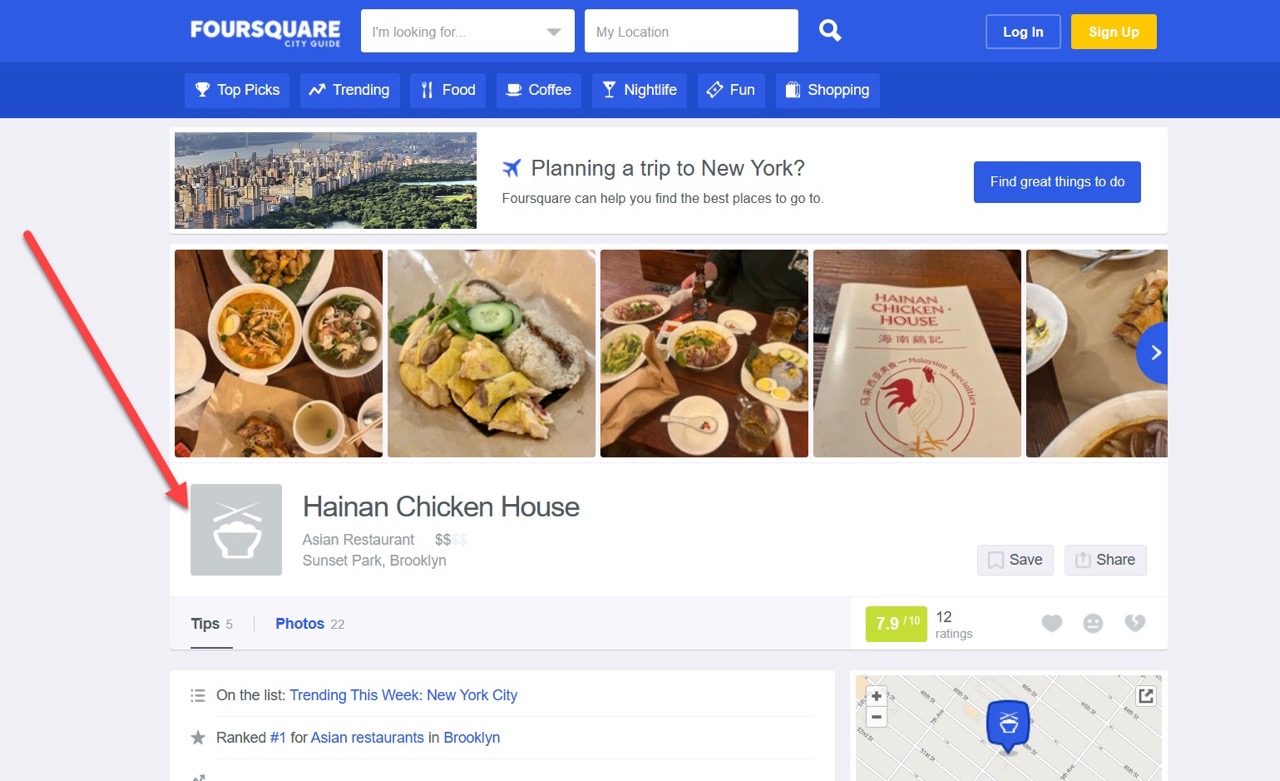
    Here’s an example of a local citation on the Foursquare city guide.

    example of a local citation

    This kind of citation helps people discover your local business online and enables them to contact you or locate your physical address.

    But that’s not all. 

    In search engine optimization (SEO), local citations play a critical role in getting local businesses to rank high on the top pages of search engines (SERP). 

    This means local citation can boost your SEO efforts and get your business to reach millions of people in a target location. So, if you are not maximizing local citations already, you are missing out on a huge opportunity.

    This article will show you how to succesfully do local citations for your small business. 

    But before we get into the HOW, let’s talk about the WHY.

    Why Are Local Citations Important?

    There are two significant reasons why every small business shouldn’t ignore local citations. 

    Reason #1: To Rank Higher on Search Engine Result Pages for Local Search Queries

    Local citations will make your business appear more in online local searches for what you offer.

    A survey by Moz suggested that citations are the fifth most crucial signal that helps businesses rank higher for local queries. Even better if the citations have a link that points people to your business’ website. 

    Hence, such backlinks will make Google and other search engines rank your website for searches relating to your business. 

    Here’s an example of local plumbing businesses currently ranking on Google for the search query “plumbing services in New York.”


    Reason #2: To Help People Discover Your Business 

    Many people like to find local businesses in public directories like the Yellow Pages, Yelp, Google My Business, and the Chamber of Commerce.

    Having your business listed on these directories will help people find you through various online mediums.

    In the screenshot below, some local tilers listed on Google Business quickly popped up when we searched for “tilers in Wisconsin.”

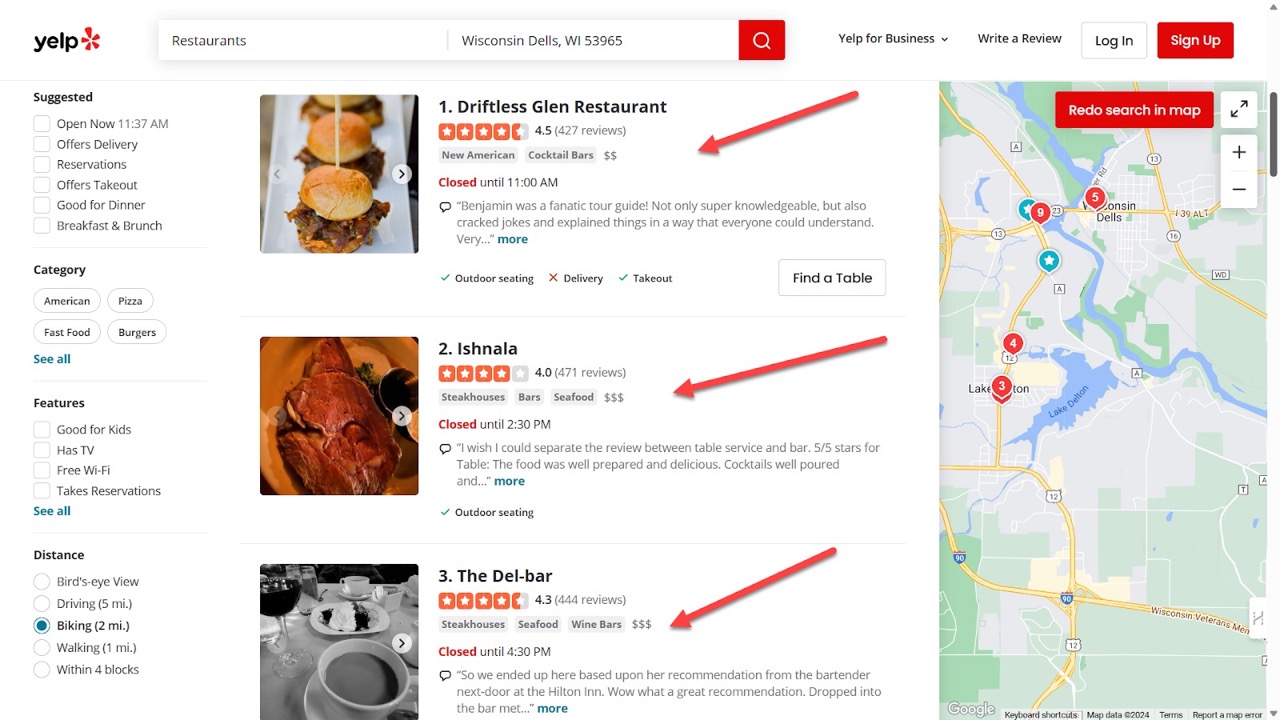
    Similarly, when we searched for the same thing on Yelp, we discovered new local tiling businesses we had never seen before.

    You see how in a matter of minutes, we now know four local tilers in Wisconsin, United States.  

    We can easily contact these four tilers whenever we need tiling services because their business names, phone numbers, addresses, and websites are listed. 

    Now before we dive into how to do local citations, let’s explain one critical point – the types of local citations out there. 

    Types of Local Citations

    There are basically two types of local citations online. Here’s a simple explanation of both.

    1. Unstructured Citations

    These citations are mainly contextual mentions of a local business. You’ll often find such in a blog post or general posts on a public forum.

    In some cases, unstructured citations can appear in a press mention of local businesses. 

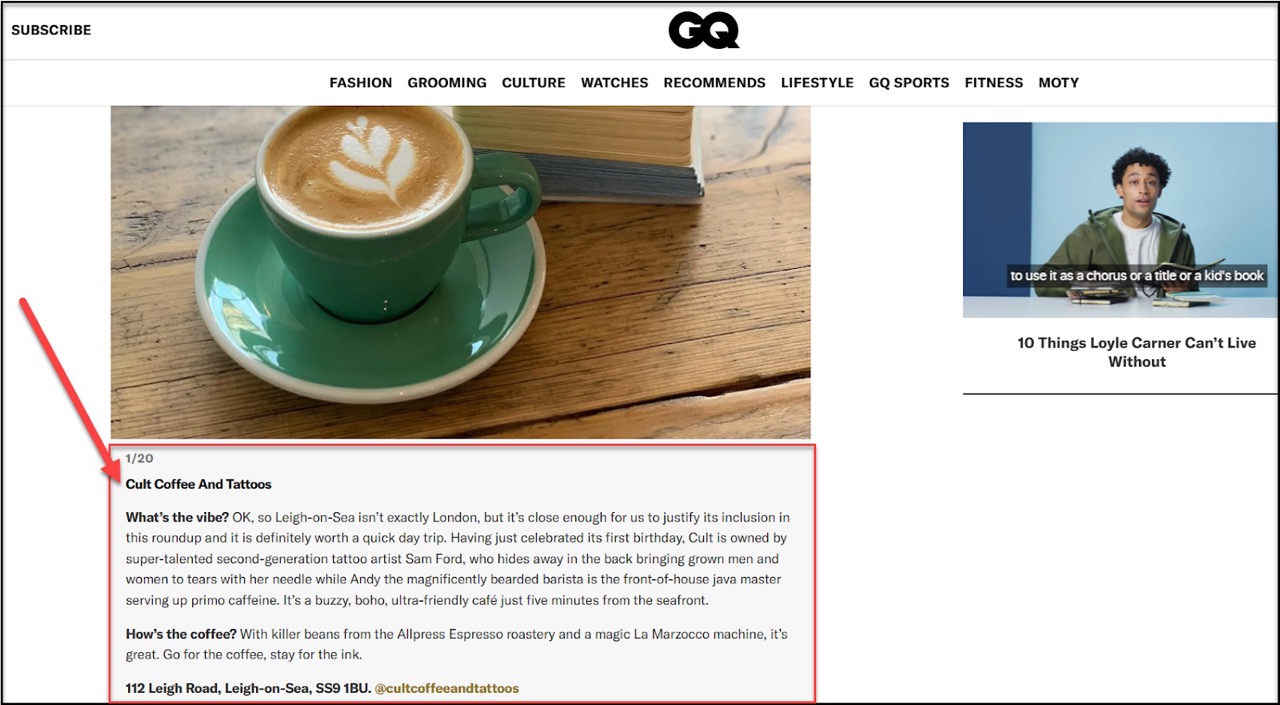
    Here’s an example from a blog post reviewing the best cafes in London:

    The above blog post reviewed a couple of great cafes in London and added their physical addresses, websites, and contact info. 

    Also, there are other instances where such a citation only highlights the business address or phone number without mentioning the website or additional info. 

    That’s why they are called “unstructured” citations. 

    2. Structured Citations

    As the name implies, structured citations always follow a standard. 

    You’ll often see the citations displayed in the same format for every company. At the bare minimum, a structured citation would list the business name, address, and phone number (NAP). 

    These kinds of citations mostly appear on public directories and social media profiles. The example below shows three businesses listed in similar ways on Yelp.

    example of three businesses listed in similar ways on Yelp Large


    Now that we’ve explained what local citations mean, let’s dive into how you can get citations for your own business. 

    How To Do Local Citations for Your Small Business

    To begin with, let’s clarify that both structured and unstructured types of citations are good for your business. 

    And by that, we mean …

    But don’t get too carried away; quality matters over quantity when it comes to local citations. 

    Follow the steps below to get high-quality local citations for your small business.

    Step 1: Get Cited on Top Data Aggregators

    If you search online, you’ll find thousands of business directories with helpful information on various local businesses. 

    Which begs the question… how do they manage to gather such huge amounts of information?

    If they keep waiting for local business owners to submit the data, there will be many gaps, and some people will take ages before submitting theirs.

    The secret solution lies with some companies called “data aggregators.”

    Yes, these aggregators collect various businesses’ names, addresses, and phone numbers (NAP) and distribute them to hundreds of directory websites. 

    Now, your goal is to get your business information submitted to these aggregators. 

    If your business is in the United States, focus on top aggregators like:

    To submit your business information, visit the website of an aggregator company and search for your business name, phone number, or address. 

    Here’s a demonstration for Data Axle local listings:

    If they have an existing listing for your business, go ahead and claim it.

    But if no existing record appears, contact the aggregator company to make a fresh submission of your NAP information. In most cases, fresh submissions are free, but you’ll need to contact the aggregator company via email or phone. 

    See the screenshot below showing how to contact Data Axle company for a fresh submission.

    By submitting your information to popular aggregators, your business data will end up getting cited in many places.  

    Step 2: Submit Your Business Info on Industry Directories

    Aside from claiming your spot with aggregators, you should also target industry-specific directories and location-specific business directories. 

    Examples of such directories include TripAdvisor, Zillow, Findlaw, eLocal USA, etc. 

    • If you are an attorney or you run a law firm, consider listing on Findlaw.com.
    • If you run own a hotel or restaurant, list it on TripAdvisor, and Zillow.
    • If you’re a realtor, consider listing your business on realtor.com.

    Meanwhile, a website like eLocal USA is geo-specific and only meant for listing local businesses in the U.S.

    You can find more of these types of directories by simply doing a Google search using queries like:

    • [location] business listings – e.g. Canada business listings
    • [industry] business listings – e.g., Realtor business listings

    Google will show you valuable results, like in the image below.

    Step 3: Get Listed on Other Public Directories

    After submitting your business data on industry-specific sites, take a step further to get listed on other popular public directories like:

    While there are other such directories online, you don’t have to get listed on all. Just focus on the most popular ones listed above.

    For instance, Google gets over 8.5 billion searches daily, and 46% of them have local intentThat means setting up a Google Business Profile will expose your local business to millions of potential customers daily.

    If you don’t yet have a Google Business Profile, follow these steps to set up one right now.

    1. Visit the Google Business page.
    2. Click on the “Manage Now” button in the top right corner.
    3. Sign In with your Google account (it’s better to have a separate Google account for your business).
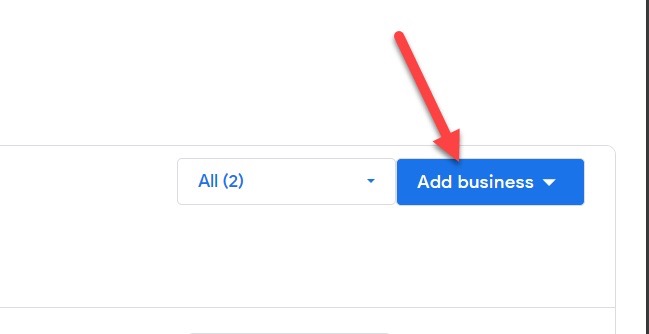
    4. After successfully signing in with a Google account, click the “Add Business” button.Google Business registration
    5. Fill in the name of your business, select the correct category, and enter every other important information needed.
    6. Select the option to enter the location of your business manually (it’s the easiest option).
    7. Enter the correct address and location of your small business.
    8. Enter the website of your business and the correct contact information.
    9. Select the correct business open hours and days.


    And that’s it. Just wait for Google to verify your business and afterward list your business for free.

    Step 4: Hunt After Unstructured Citations

    When you’ve secured many structured citations for your business, your next move is to go after unstructured citations.

    This type of citation usually appears in online reviews, press mentions, and blog posts relating to your services. And this means unstructured citations don’t always come easy. 

    Someone who knows about your business would have to mention you in their review, blog post, or press feature. 

    Something like this:

    how to do local citations

    But instead of waiting for random press websites and blogs to mention your business, reach out to them. Find a blog that writes about products or services and speak with them about partnerships. 

    You can offer them a free product or service so that they can review it first-hand and mention your business in their subsequent publications.

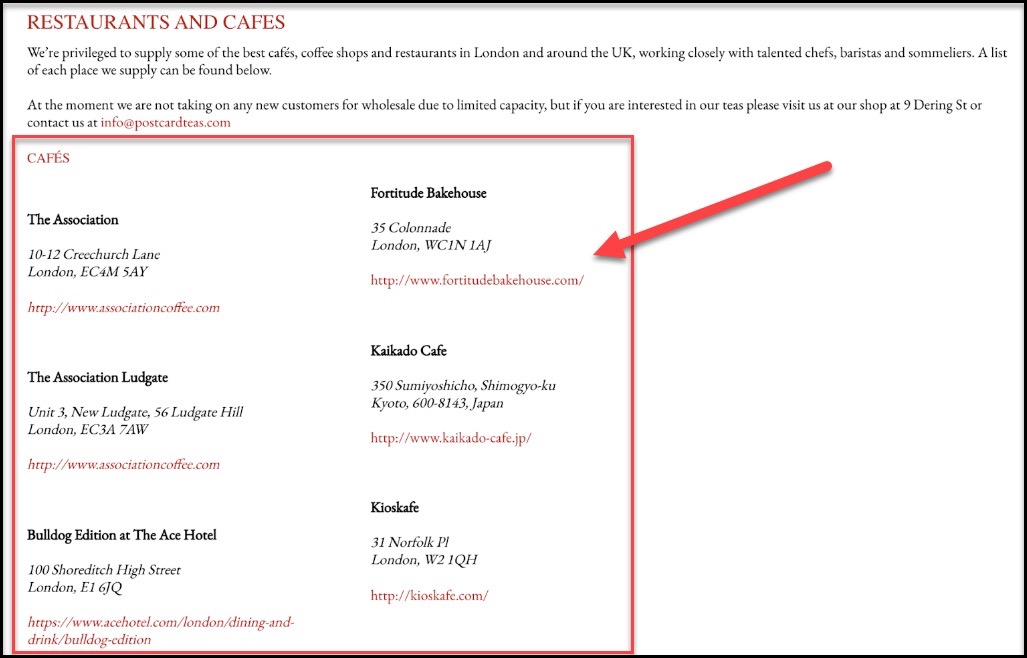
    Another way to get unstructured citations is by getting listed on supplier pages. Contact your suppliers and ask if they can mention your business on their website as one of the people they supply.

    See the example below. 

    unstructured citation example

    Image source: Postcard Teas

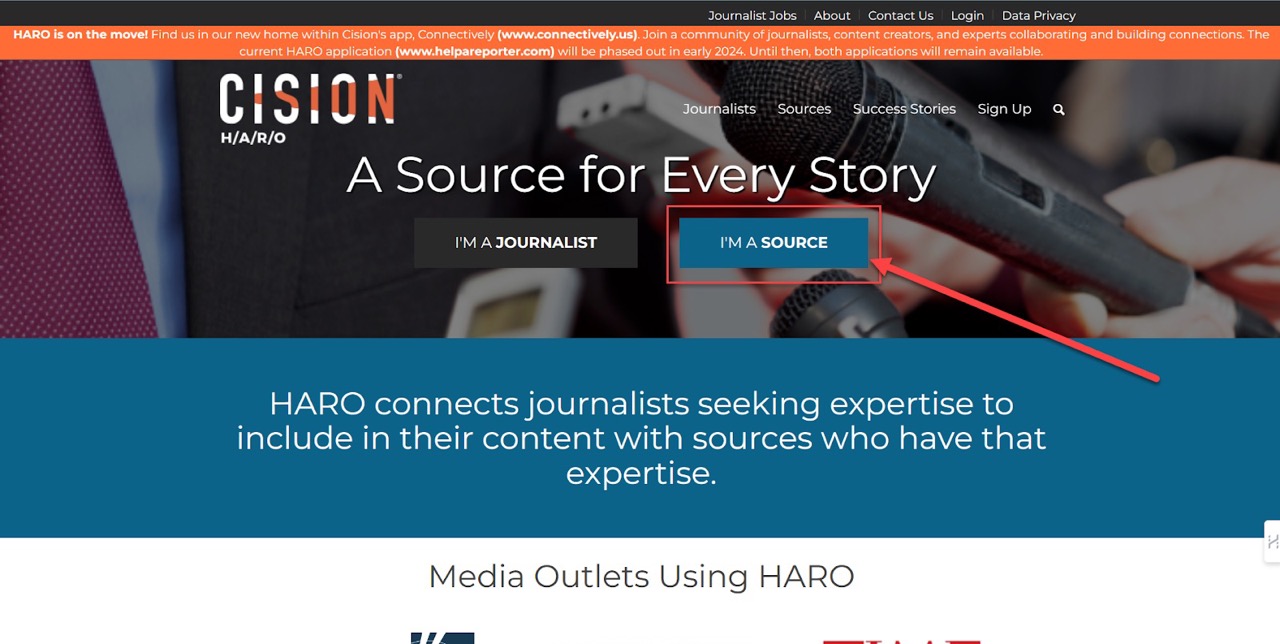
    And if you want press mentions, you can use the free Help A Reporter Out (HARO) service.

    This HARO service will help you connect with journalists sourcing for upcoming stories they can write about. Simply visit the website and click the “I’m a Source” button, as shown in the screenshot below.

    Help A Report Out homepage

    Here’s a brief explanation of how HARO works.

    Sign up to get daily emails from journalists working on their next press feature. 

    The journalists will mostly ask questions and expect you to supply them with authentic answers that they can use. 

    If any of your answers get used in an upcoming article, your business will be cited in the publication. 

    It might take a while before you get your first mention, but this method works well for getting high-quality unstructured citations and backlinks. 

    Pro Tip: Consistency Matters in Local Citations

    No one likes being confused by inconsistent and inaccurate information.

    You don’t want a situation where your business’s phone number on Yelp differs from the one on your Google business profile.

    It’s even worse if the address information has errors and inconsistencies. How can the same local business have contrasting contact details and address information on various public directories? 

    A BrightLocal study in 2018 showed that 80% of consumers quickly lose trust in companies with inconsistent names or contact details. 

    Avoid this common error by frequently checking your existing citations to see if there are inconsistencies. Once a month, look at your business data on top aggregators’ websites and on public directories like Google Business.

    If you find errors, correct them to ensure the accuracy and consistency of your business information in all citations. 

    Conclusion on Doing Local Citations for Small Businesses

    Local citations boost your SEO efforts and give your business broader exposure. 

    And the good thing about citations is that they are mostly free to get. However, it can be quite overwhelming if you intend to do local citations by yourself. 

    You have to seek citation opportunities in popular business directories, public listings, press mentions, online blogs, and social media pages. Not to mention other gated techniques you won’t find easily.

    If that feels like a lot of work for you, contact us at Inscribe, and we’ll get you the best citations to elevate your small business. 

  • 10 Common Local SEO Mistakes and How to Avoid Them

    10 Common Local SEO Mistakes and How to Avoid Them

    Local SEO is an efficient and sustainable way to attract organic traffic and the right attention to your local business. 

    Speaking of attention, do you know Google processes around 8.5 billion searches daily? And 46% of these searches on Google have local intent.  

    Now, imagine your business showing up among local searches for products or services in your industry. 

    Won’t that be fulfilling?

    With the help of Local SEO, you can easily achieve this. However, when doing local SEO, you must avoid a few mistakes, so your efforts don’t go down the drain. In this article, we’ll uncover 10 common Local SEO mistakes and how you can avoid them.

    Top 10 Common Local SEO Mistakes and How To Avoid Them

    These common mistakes can sabotage your local SEO efforts if not corrected. 

    1. Lack of Multiple Directory Profiles

    Listing your business in just one public directory is not enough.

    What’s even worse is not having your business listed in any public directory at all.

    Naturally, your local business will gain more credibility when it’s listed on public directories like Google Business, Yellow Pages, Bing Places, and Yelp. But more importantly, search engines love it when your business is listed on multiple public directories with the same company information. 

    It shows that your business is “REAL” and worth ranking in your location. 

    Having multiple directory profiles also means customers can find your business in whichever public directory they look.

    2. No Google Business Profile

    Even if you aren’t listed on other public directories, getting listed on Google Business is a must. Google is the biggest search engine in the world, with about 91.54% of the search engine market share

    So, not listing your business on Google is like hiding away from 90% of the world’s daily searches. To put this in a better perspective, you would be hidden from the 8.5 billion searches Google processes daily.

    Here’s an example of a Google business profile of a local business based in the United States. 

    Image source: Google

    3. Inconsistencies in NAPW Info

    NAPW is an abbreviation for Name, Address, Phone number, and Website.

    This information shouldn’t be inconsistent across multiple listings for the same company. Always remember to update business profiles on directories after changing phone numbers or moving your business to a new location. 

    Having inconsistent NAPW information can confuse search engines and even your potential customers.

    4. Less or No Customer Reviews

    It’s a huge mistake when businesses view customer reviews as a “nice to have” thing.

    Imagine if someone searched online for “nearby restaurants,” and a couple of nice places popped up. How do you think the person would choose which restaurants to go to?

    For many people, they’d simply choose the restaurant with the best customer reviews. Having lots of customer reviews will give your local business more credibility. 

    Even search engines prefer and rank businesses with lots of positive customer reviews.

    5. Neglecting Negative Reviews

    Negative customer reviews can be tough to swallow sometimes, especially when the customer is rude, inconsiderate, and uncooperative. 

    But no matter how negative the review, never ignore it. As awkward as it may sound, the presence of one or two negative reviews sometimes makes a business feel more “REAL.”

    That’s why you shouldn’t ignore such reviews but instead respond with high professionalism. Your response alone can be the reason why potential customers feel convinced to do business with you.  

    6. Generalized Keyword Targets

    That’s like expecting to hit the bullseye while shooting everywhere with no target in mind.

    Instead of attempting to rank for a keyword like “best plumbing services”, why not target “best plumbing service in Arizona”? The keyword “best plumbing services” is too generic and would only set you against many competitors globally.

    But if your services only cover a specific area like Arizona, you would achieve better SEO results by targeting “best plumbing service in Arizona.” 

    Another good example is targeting “Kid dentist Chicago” instead of a generic keyword like “best dentist for kids.”

    7. Keyword Stuffing

    Adding keywords to different areas on your website and public listings is a good SEO practice. However, overdoing it is bad and can sabotage your SEO efforts. 

    You shouldn’t stuff 45 different keywords on your website because they are all related to your products and services. 

    Even if you found 150+ high-quality keywords, ensure you only use them where they fit naturally. Sprinkle them in your website content, meta descriptions, image alt text, and even your business profiles on public directories like Yelp and Google. 

    Remember, you don’t have to use up all your keywords. You can achieve excellent results with just a few keywords used properly. 

    8. Not Optimizing Website for Mobile

    A recent survey shows that mobile phones make up 53.59% of the worldwide market share of device usage. So, definitely, more people will view your business’ website on mobile phones than desktop or laptop devices. 

    Google has also stated that mobile-friendliness is one of the top factors they consider in ranking websites. That’s why you should optimize your website to load faster and respond smoothly on mobile devices.

    9. Not Optimizing Website Images

    Imagine someone searching for a plumbing service in their area to fix broken pipes. Wouldn’t they love to see photos of a repaired broken pipe done by a nearby plumber? 

    Something like this:

    Image source: Waterextractionexperts

    And guess what: search engines also love to index such photos and would show them to people searching for a related keyword like “hire a plumber to fix my broken pipe”

    But if all the photos on your website aren’t optimized, how would search engines know that your plumbing service covers broken pipes?

    Give descriptive names to the images you use on your website and add an ALT text for each.

    See the example below.

    Image source: ImageSeo

    Optimizing your website images will boost your local SEO efforts and even attract more traffic from image searches.

    10. Missing Contact Info on the Website

    Even if your contact info is already on your public directory profiles, you should still add it to your website.

    It could be somewhere at the bottom of each page, just as seen below.

    It’s a total waste if your website ranks on top of search engine result pages, but no one can reach you because your website has no contact info. Add your contact address, email, and phone number. If possible, embed Google Maps to help potential customers locate your physical office. 

    Final Thoughts

    If you’ve been making any of these local SEO mistakes, correct them now, and you’ll notice a huge improvement in your sales and revenue. 

    List your business on multiple public directories with consistent contact info and use specific keywords relevant to your location. More importantly, optimize your website images because they’ll help you draw more attention from image searches.

    However, if this is outside of your expertise and you’d prefer professional help, reach out to Inscribe. We’ve generated over $10 million in revenue for our clients, and we can help you use local SEO to get more customers. Book a call here to get started. 


  • How to do Multilingual SEO for Content Localization

    How to do Multilingual SEO for Content Localization

    Today, many businesses are breaking into international markets to reach more customers.

    However, the question remains – how do businesses sell to customers with different languages and cultural backgrounds? How do you optimize your website to rank in other countries as well?

    The answer lies in multilingual SEO.

    This can be overwhelming, so in this article, we’ll show you how to do multilingual SEO effectively. You’re not alone on this.

    Let’s dive in.

    A Brief Overview of Content Localization

    Content localization is the process of targeting a particular audience by modifying existing content and user experience to fit the audience’s language and cultural preferences.

    However, content localization goes beyond mere translation to other languages. It includes optimizing content for local searches as well, and this is where multilingual SEO comes in. 

    What Is Multilingual SEO?

    Multilingual SEO is the art of optimizing multi-language (localized) content for search engines. It involves using SEO best practices that align with the target region of the content.

    You don’t want to confuse Google and other search engine bots that are trying to rank you, do you?

    Why?

    Because the people you’re trying to target are most likely to search on Google using their native language. For example, if you’re trying to target Spanish folks, it’s best your content is written in Spanish.

    You get the picture?

    Not to worry though, multilingual SEO is just like regular SEO. The only difference is that you have to optimize your content for different languages. 

    With that said, let’s discuss how to do multilingual SEO.

    How to do Multilingual SEO for Content Localization

    Here’s how you can break into international markets with content localization and multilingual SEO. 

    1. Conduct In-Depth Keyword Research for Each Target Market

    This is the first and most crucial step in an SEO-conscious localization process. Find keywords your target audience is using to find businesses like yours. 

    Powerful tools like Semrush, Ahrefs, and Google’s Keyword Planner will help you narrow your keyword research to specific countries. And when you find the top keywords for each country, you’ll be able to optimize your localized content to rank in the appropriate region. 

    Pro tip: If you are targeting 3 different regions, ensure you separate the keywords for each area. Don’t mix the top keywords trending in the United States with the ones for Canada or Australia. 

    2. Dig Into Cultural Nuances

    What works in one country may not work in another, even if they seem similar. You have to dig deeper to understand the cultural nuances of your target regions. 

    For instance, what Americans popularly call “French fries” or “fries” is what the British know as “Chips.” And what the French-speaking people call “café” is what English speakers refer to as “coffee shop.”

    This makes it crucial to dig into the language and culture of your target audience when localizing your content – and it affects SEO too. You shouldn’t be optimizing for the keyword “coffee shop” when your target audience is searching for “café.” 

    3. Work With Language Experts and Translators

    Automated translation tools have improved over the years, especially those with advanced Artificial Intelligence.

    However, they are still no match for the accuracy and cultural awareness of expert human translators. So even if you use a translation tool, ensure you hire an expert translator to check for errors and cultural appropriateness. 

    4. Translate All Metadata and Alt Text

    Just because metadata and Alt text are hidden doesn’t mean you should ignore them. Paying attention to this tiny detail can make your localized content shoot to the first page of local searches in the target regions. 

    5. Implement the Hreflang HTML Tags

    Don’t let the name scare you. It’s nothing complicated at all.

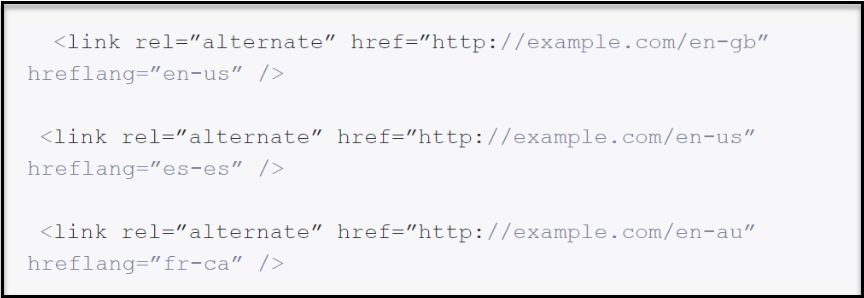
    Hreflang HTML tags are just simple tags embedded inside website pages to tell search engines that different versions are available for specific regions. 

    See an example in the image below.

    How to do multilingual seo

    Image source: Lokalise

    In the image above, the Hreflang HTML tags specify that the website “example.com” has French-Canadian, Spain-Spanish, and American-English versions. 

    After localization, adding such tags to your website will tell search bots what to do, and help others find your website easily – bringing you significant organic traffic in the long run.

    6. Build High-Quality Local Backlinks

    Search engines like Google would take longer to rank your localized content if no trusted websites are linking back to your website. 

    These “trusted” websites are usually popular news outlets, public forums, government-owned websites, or any reputable local website in a target region. 

    You would need to conduct outreach campaigns to connect with these reputable local websites.

    A good idea is to write an article about a new trend in the local region and pitch that to a reputable news website. But somewhere inside the article you pitch, ensure you include a link pointing back to your localized website. Preferably a do-follow link.

    This way, search engines understand that reputable local websites find your content relevant.

    7. Optimize for Speed and Responsiveness

    We live in an era where our attention span is barely 8 seconds.

    No one would enjoy browsing through a slow and unresponsive website even if it’s displayed in their language and optimized for SEO. That’s why you should check your website’s speed, especially after implementing localization.

    And don’t forget to also check the responsiveness of your localized website on both desktop and mobile devices. Is the website displaying nicely on mobile? Are all the buttons working after localization?

    For example, you don’t want to discover that your website’s “Checkout” button isn’t working on mobile devices. So, ensure you check for these issues and address them if they happen.

    Pro Tip

    Consider implementing region-specific URLs

    Something like “www.mysweetshop.fr” for France and “www.mysweetshop.co.uk” for the U.K. It’s obvious that both websites belong to the same company, “MySweetShop,” but the URL extensions are unique for different regions. 

    This method works well for localizing different versions of a website. Plus, search engines will easily rank websites with region-specific URLs for local searches in a specific region.

    In Conclusion

    If you can implement these tips, your journey into international markets will be easier. Within a few months, your business can start ranking in your specific target regions. And when that happens, your customers will increase as well.

    So, dear reader, let these tips guide your multilingual SEO process.

    Goodluck!

  • Mobile SEO 101: How To Optimize Your SEO Strategy for Mobile Users

    Mobile SEO 101: How To Optimize Your SEO Strategy for Mobile Users

    So you have an SEO-optimized website that looks gorgeous on laptops and desktops?

    Good job.

    But does the website work well on mobile devices?

    Google uses mobile-first indexing, meaning Google predominantly uses the mobile version of a site’s content for indexing and ranking. So, if your SEO strategy doesn’t cater to mobile users, your website may not even smell ranking. 

    The good news is that you can fix this.

    In this article, we’ll discuss mobile SEO and show you how to optimize your SEO strategy for mobile users. 

    To Start With…What Is Mobile SEO?

    Mobile SEO is the process of making the mobile version of your website – rank higher in search engines. This includes making your website easy to view, navigate, and use on smaller devices like smartphones and tablets. 

    And more importantly, the process requires making the mobile version of your website accessible to search engine crawlers. These spiders (or crawlers) are responsible for analyzing your website, indexing the content, and ranking the site on mobile search result pages.

    In this era where more people use smartphones than desktops, every website owner must consider mobile SEO. 

    Here are some stats showing the growing trend in mobile device usage worldwide. 

    • Mobile usage makes up 53.59% of the global market share when comparing desktop to mobile and tablet devices.
    • A recent study shows that the average person spends 3 hours and 15 minutes on their phone daily.
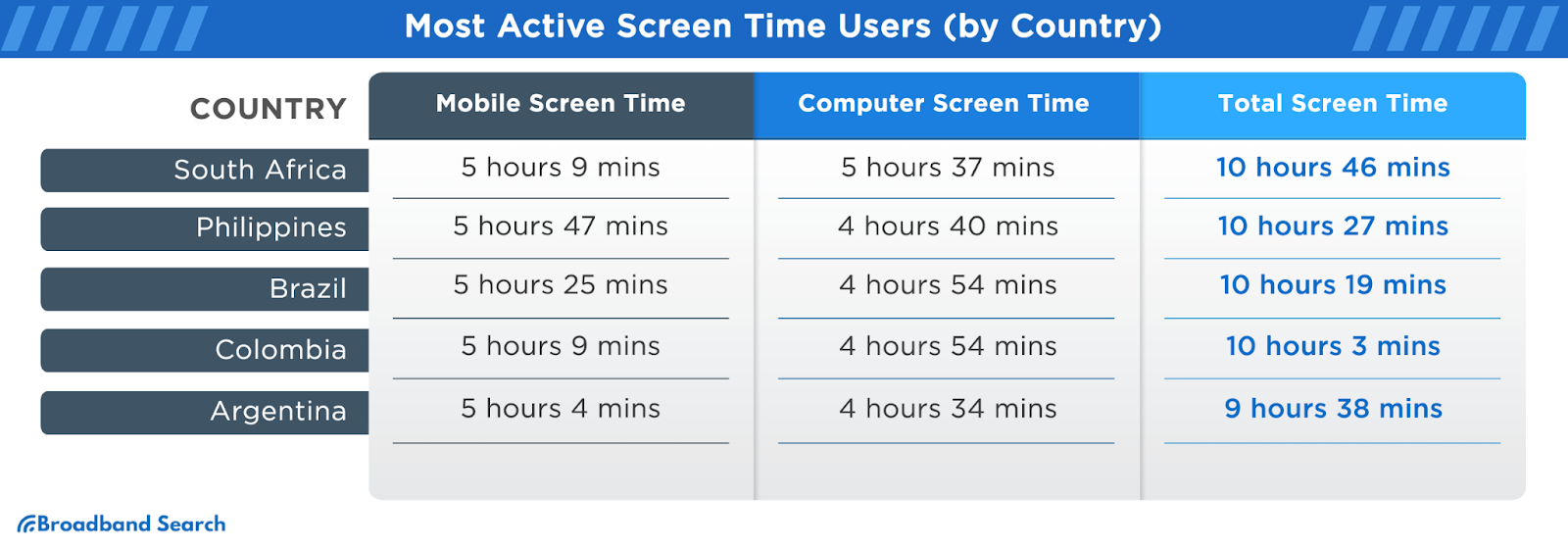
    • A recent article by Broadband Search reveals that 98% of Gen Z (people born after 1997) spend over 4 hours daily on mobile devices.  

    Mobile SEO

    Image source: Broadband Search

    With that established, let’s discuss how to cater to mobile users in your SEO strategy. 

    9 Ways To Optimize Your SEO Strategy for Mobile Users

    Mobile SEO is not difficult.

    You only need to do a few things to complement your existing SEO efforts, some of which include:

    1. Allow Bots To Crawl Everything Necessary

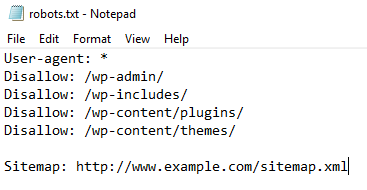
    Depending on the platform you use, check the Admin side of your website to access a “robots.txt” file.

    This file specifies which pages and content you don’t want search engines to crawl or index. (i.e., blocked from the public)

    See an example here:

    Mobile SEO Robots-txt

    It’s fine if your site’s Robot.txt file has instructions to block out the Admin page, customer images folder, etc.

    However, ensure your blog or articles section isn’t blocked. If it is, crawl bots won’t be able to crawl your blogs and rank your website in SERPs (Search engine results pages). 

    2. Use a Responsive Mobile Design

    A website with a responsive design should work well across all platforms, including laptops, tablets, and smartphones. You don’t want a website that only works on desktop and is horrible on mobile.

    Most popular website builders often have responsive designs coded into their templates. However, if your website isn’t functional on mobile, talk to your web designer.

    P.S: If your website uses responsive design, Google recommends setting up a particular tag called “viewport meta tag.”

    This tag helps to change the size of your website pages to fit each user’s device. 

    Whether your website already has the tag or not, Google recommends writing the tag this way: <meta name=viewport content=”width=device-width, initial-scale=1”>

    And if you need a tool for testing the responsiveness of your website, check out this one here.

    3. Reduce Popups

    Ever had popups blocking your view while trying to read something online?

    Yeah, it’s annoying.

    While it’s less intrusive on desktops or laptops with big screens, popups can be a big turnoff on mobile devices. Even worse, Google once rolled out an update against “intrusive” popups.

    So, tone down your popups for the sake of mobile users and to get better SEO rankings. 

    4. Optimize Titles and Description Tags for Mobile

    When posting blog content on your website, you’ll need to provide a title and a description. Especially if you use WordPress to manage your website, and you have Yoast SEO installed, you have to provide meta descriptions for every article. 

    The general rule of thumb is to keep the descriptions and the titles relatively short.

    However, here are the character limits that Google recommends:

    • For Mobile: The title should be approximately 78 characters, while the description should be 155.
    • For Desktop: The title should be approximately 70 characters, while the description should be 155.

    While Google gives more characters to the Title tags on mobile, don’t let that trick you into writing longer titles. If your titles are too long, search engines may not rank them easily, or show snippets.

    5. Show Content at Once to Mobile Users

    Google and other search engines can’t crawl content that requires an action before being displayed fully.

    Here’s an example of a webpage requiring visitors to click the “Read the rest of this article” before seeing the full content.

    How not to do mobile SEO

    Image source: Smashingmagazine

    This practice doesn’t help your SEO rankings, because search engine crawl bots would think such a webpage lacks content and they’ll abandon it. 

    6. Use Smaller Header Images 

    This is a user-experience hack for tidying things on desktop and mobile.

    Image source: Nicepage

    The above header image looks beautiful on desktop devices. But it can be an issue on mobile. Such a large image will shrink or become warped when viewed on mobile. 

    This is why you should use a smaller header image that displays clearly on mobile and desktop devices. 

    7. Make Your Content Easy To Read on Mobile

    No one wants to pinch and zoom in on different parts of your website to get valuable information. So, ensure that the font of your website content is well-optimized for mobile users.

    In fact, recent studies say that the average human attention span is 8.25 seconds. This means more people are likely to leave your website abruptly – if they encounter the smallest difficulty navigating your website. 

    You can significantly reduce your website’s bounce rate by making your content easy to read on mobile.

    8. Put Social Share Buttons in a Tab Bar

    Social share buttons make it easy for people on your website to share your content directly to Twitter, Facebook, Instagram, and other social media channels. 

    However, the screen estate on mobile is small; hence, there’s hardly any room for putting animated social share buttons. A smooth way to add these buttons is by putting them in a tab bar that doesn’t hinder a mobile user’s experience. 

    If your social share buttons are non-intrusive, more people will share your content on mobile, which in turn, improves your SEO ranking.

    9. Optimize Your Page Speed on Mobile

    Google recommends making your website load in under a second, which is a major SEO factor when ranking any website.

    You can use the Google PageSpeed Insights tool to check your website’s loading speed on mobile. The tool will also provide recommendations to improve your website’s speed.

    Here’s a scan result from the Google PageSpeed Insights tool.


    Now, once you’re done optimizing your website for mobile SEO, you should also check if the website is mobile-friendly.  

    How To Check if Your Website Is Mobile-Friendly

    We’ll recommend two methods to check if your website works well on mobile.

    1. Check Manually on a Device

    This is the best method, as it entails checking your website on an actual smartphone. Input the website’s URL on a mobile device browser and check for the following:

    • How fast do the pages load?
    • What functionality works fine?
    • How easy is it to read the content on mobile?
    • Are there disruptive popups that should be removed?

    2. Use Google’s Mobile Usability Tool

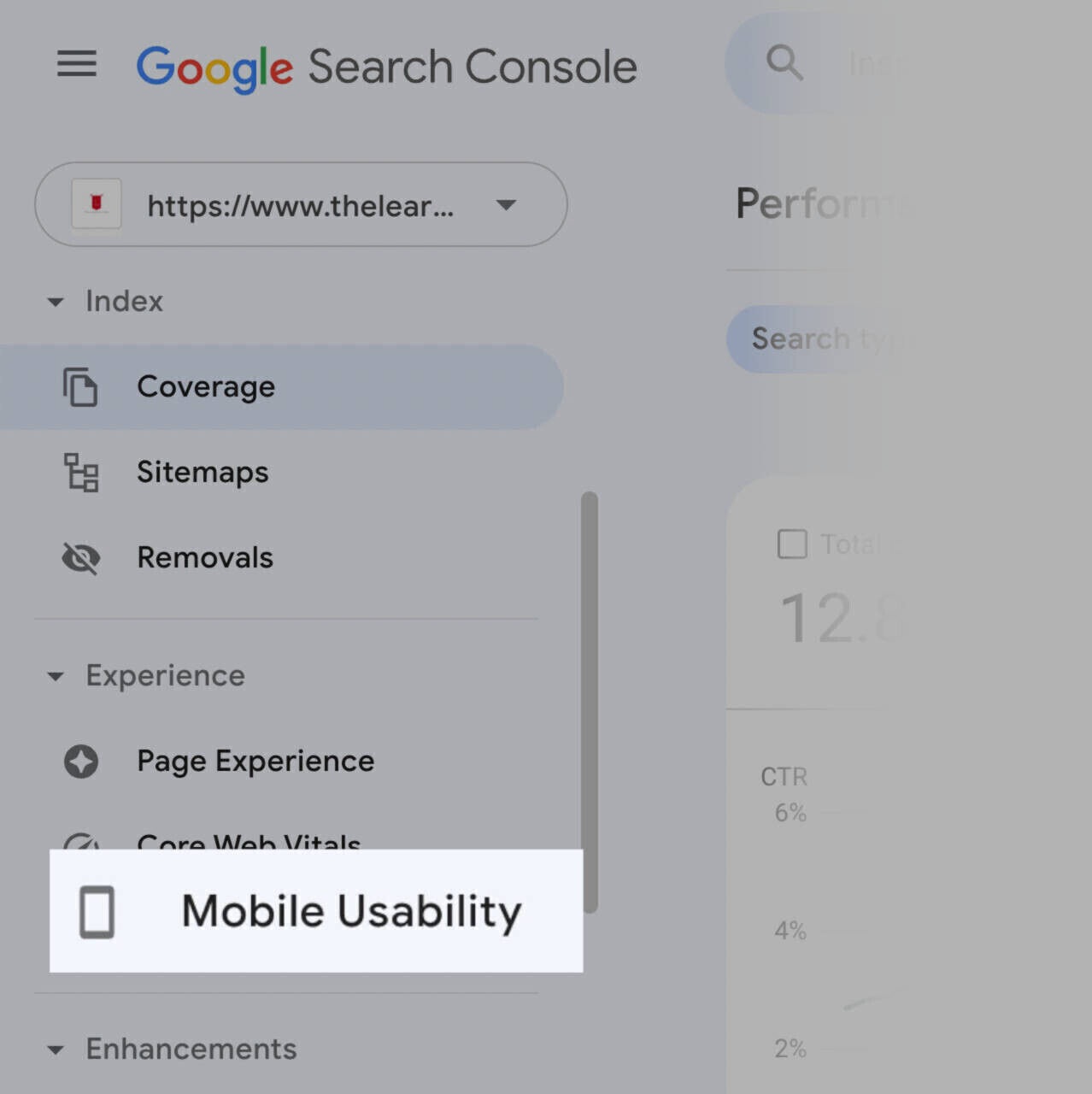
    The Mobile Usability tool is a cool feature on Google Search Console, and it helps you examine if your website is usable on mobile.  

    Here’s how you can use the Mobile Usability tool in 2 simple steps.

    • Log into your Google Search Console and click the “Mobile Usability” option on the left menu.

    Google's Mobile Usability tool

    Image source: Semrush

    • Check the information provided on the report screen. It should tell you what to fix and how many pages are affected. See the example below.

    Conclusion on Optimizing for Mobile SEO

    The best strategies for mobile SEO include crafting mobile-friendly content, optimizing for voice search, and using structured data.

    In addition, ensure that the loading time of your website on mobile isn’t an eternity. Optimize your title tags and meta descriptions for SERPs on mobile. 

    If you can tweak your mobile SEO strategy using these simple tips, you’ll see a significant spike in your search engine rankings. 

  • Blogging Guide For Saas Companies: Everything You Need To Know

    Blogging Guide For Saas Companies: Everything You Need To Know

    Maintaining an active blog is the cheapest way to drive paid signups and increase revenue for your SaaS product. 

    How?

    Google – the largest search engine in the world with over 8 billion searches per day, can drive organic traffic to your website – when you post valuable content on your blog.

    Yes. Google can do all the heavy lifting for you – when you’ve laid a solid foundation to attract organic traffic.

    But how, still?

    You’ll want to read this guide.

    In this explicit blogging guide for SaaS companies, we’ll discuss everything you need to know about SaaS blogging, and how it can help you drive organic traffic. 

    But First…What Is a SaaS Blog?

    A SaaS blog is a section of your website aimed at educating your target audience about your product.

    Now, “educating” involves several things. 

    Generally, it involves giving valuable information about the products and services offered by your SaaS company. All of which can include:

    • Industry news
    • How-to guides
    • Product reviews
    • Trending SaaS topics
    • How to use your product
    • Tips and tricks to using your product
    • Addressing the pain points of your audience
    • Product reviews & comparison with other competitors
    • How your audience can overcome their pain points with your product

    …and many more. 

    Step-by-Step Blogging Guide for SaaS Companies

    Now that we’ve established what a SaaS blog is, let’s dive into how you can start blogging.

    Step #1: Lay the Foundation 

    The first step is to understand your target audience on a deeper level. Do detailed research to uncover details like gender, age range, pain points, and interests.

    You should also gauge the awareness level of your audience.

    Awareness levels range from being fully aware, semi-aware, or unaware of your products or services. Also, decipher their search intent, whether they only need information or want to make a purchase immediately.

    Tools like SEMrush, Surfer SEO and Ahrefs can help you with this research. 

    Step #2: Create a Content Strategy for Your SaaS Blog

    The content on your SaaS blog must be strategic and well thought-out. 

    Your blog content must align with SEO best practices if you want customers to find your products through Google.

    Question is, how do you create content that actually ranks on Google and drives customers to you?

    The answer lies in having a targeted content strategy.

    A content strategy is a game plan that helps you dance to the tune of Google – to easily attract customers to your business from Google.

    Like the GPS for your content – a Content Strategy guides where your content should go, how to get there, and ensures it doesn’t get lost in the jungle of other “content” out there.

    Here’s how to create a content strategy 

    • Action Point 1: Keyword Research

    Keyword research is the process of uncovering keywords that your target audience uses to discover products or services in your industry. You’ll need tools like SEMRush, Surfer SEO, Ahrefs, or Answer the Public to dig out powerful keywords and topics people search for in the SaaS industry. 

    A Screenshot Showing Keyword Research

    A Screenshot Showing Keyword Research

    Keywords fall into two major categories:

    1. Branded Keywords

    Branded keywords have your “brand names” in them. These keywords are often used by people who know about your business. They just need help navigating to your website or a particular section of your website. For example, typing “Binance” into the search engine will most likely bring up Binance’s website. 

    2. Non-branded Keywords

    On the flip side, non-branded keywords don’t have your “brand name” in it. However, they’re keywords still used to find brands in your industry. For example, “non-branded” keywords like; “top cryptocurrency company” and “where to buy cryptocurrency” can find crypto companies like Coinbase, Binance, Kraken, etc. 

    Do you get the picture?

    Now, non-branded keywords rake in the most customers.

    Why?

    Because these people don’t even know you exist. They just need a solution to something– or need information on something. So they run to Google. 

    Once you do detailed keyword research, you’ll discover these keywords, and they’ll guide you in creating your blog content. 

    • Action Point 2: Categorize Your Keywords

    Now that you’ve discovered the keywords your target audience uses, it’s time to categorize the keywords accordingly.

    You have to categorize the keywords you’ve discovered (from your keyword tool) according to the audience you’re trying to target, and their search intent as well.

    These keywords will guide your next step because they’ll determine your content pillars and every other content you publish.

    That’s your content strategy right there. 

    Step #3: Create a Content Pillar

    A content pillar includes article topics built around major keywords.

    For instance, let’s say you have a SaaS AI tool. During your keyword research, you discovered that the keyword; “AI-powered SaaS tools” is a trending keyword with high volume. You can create a content pillar that’ll include several article topics to target that keyword AI-powered SaaS tools.

    This may include:

    • Top 10 AI-powered SaaS tools
    • How to use AI-powered SaaS tools
    • Pros and Cons of using AI-powered SaaS tools

    …and other relevant titles.  

    You get the picture?

    In a different scenario, you may discover your target audience keeps asking search engines how to explore the features of your software or other questions generally relating to your SaaS. In such a situation, you’ll build another content pillar around these keywords, answering all of these questions in detail. 

    Step #4: Start Writing Content

    Now that you know the audience you want to target, you’ve done keyword research, and you have your content pillar in hand, it’s time to start writing content.

    How to Create Engaging SaaS Blog Content

    Now, it’s not enough to just start writing articles. 

    Your content must be interesting and engaging. This is important so you can wield the attention of your audience from start to finish.  Here are some tips to help you create more engaging content. 

    1. Use Storytelling

    Till the ends of time, people will always love stories. Most people will sit through a lengthy fiction or real-life story if it’s interesting and inspiring. 

    So, how can you make use of this fact?

    Incorporate stories in your blog posts. Find clever ways to convey your points using case studies, anecdotes, or cajoling sentences.

    2. Include Eyes Candy

    Make your content visually appealing.

    As much as people enjoy reading stories, they also love videos, pictures, and other engaging visuals. Try GIFs, infographics, or real-time images

    3. Don’t Be Boring

    No one wants to read boring content. Doesn’t matter if your product is about gamma-equation-waves-in-the-sphere of Pluto’s orbit, or the most boring concept ever. Find a way to make it interesting – because that’s the only way anyone will read and digest your content. 

    Even in the most “professional” space ever, a little joke or humor in your blogs won’t hurt. Find a way to spice things up.

    Blog Post Ideas for a SaaS Blog

    Here are some creative ways to write content with target keywords in mind.  

    • How-to Guides

    You can create blog posts providing step-by-step instructions on how to use your software. Such guides inform your customers on the features and capacities of your product or service. Here’s a screenshot of a typical how-to guide:

    Screenshot showing a “How-to” guide. Image source: Zapier

    • Tips & Tricks posts

    Use this type of blog post to share information that users may not know. Share unconventional ways of using your software. 

    Here’s a classic example of a tips & tricks post:

    Types of SaaS blogs

    Screenshot showing a “Tips & Tricks” post. Image source: Hubspot

    • Case Studies & Customer Testimonials

    Show how existing customers use your SaaS in real-time. Include case studies and customer testimonials with metrics if available. This will make prospects more drawn to your SaaS and convinced that your product is of immense value. 

    See an example here:

    Screenshot showing a Case Study. Image source: Zapier

    • Thought Leadership Posts

    Share expert opinions within your particular industry or field. Ensure your posts provide unique perspectives, insights, and forward-thinking ideas. 

    Here’s an example:

    Screenshot showing a “Thought Leadership” post. Image source: Neil Patel

    Feature Spotlights and Reviews

    Share the best features, benefits, and real-world applications of your SaaS. Use detailed examples or case studies to show how your SaaS solves major pain points.

    See the screenshot below. 

    SaaS Blogging

    Screenshot showing a “Feature Spotlight” post. Image source: ClickUp

    Why SaaS Companies Should Be Blogging

    The most important reason ever — is to acquire more paying customers.

    No one will find your SaaS online if Google and other search engines don’t know you exist. But if that doesn’t convince you, here are other reasons you need to be actively blogging. 

    • Free Organic Traffic

    Active blogging is the easiest way to make search engines drive organic traffic to your SaaS website.

    An interesting benchmark report by Animalz revealed that 83% of popular SaaS blogs get almost all their traffic from organic search. This report further showed that SaaS companies that are actively blogging – generate 67% more leads every month. 

    Picture this: You recently launched a SaaS company that offers cloud storage for mobile phone users. You have a functional website that runs perfectly. Question is, how would you make Google and other search engines recommend your website to thousands, possibly millions – of people searching for “mobile phone cloud storage” (or related keywords) every day?

    The answer is simple – active blogging.

    When you do proper SEO-rich blogging, thousands of people searching for related keywords in your industry will find your website on a regular basis. 

    • You’ll Save Money on Ads

    Now, let’s flip the switch.

    If you were to take the route of paid ads, you’d have to pay for every single visit to your website, even those who don’t convert. That’s not only expensive in the long run, it is clearly unsustainable for most businesses. 

    With SEO-optimized blog content, you’ll have new visitors landing on your page daily. In turn, you’ll get free leads at zero cost.

    Question is, do you want more leads?

    Pro Tip: Using Social Media for SaaS Blogging

    Social media can prove powerful when combined with blogging. It’s where you can get more eyeballs on your blog.  

    You can break down your lengthy blog posts into small digestible chunks and post them on social media for a wider reach. 

    Here are some helpful tips for distributing your blog content on social media: 

    1. Use Attractive Visuals: Use GIFs, infographics, videos, and images to make things interesting and boost engagement on your social media.

    2. Use Hashtags: Relevant hashtags can bring you more visibility and drive traffic to your blog. If you’re posting about AI-powered tools, you can hashtag #productivity #AI tools. So when people search for these keywords, you have a chance to rank on the social media platform as well. 

    3. Automate Posts: You don’t need to manually post on each of your company’s social media accounts every time. Automation tools like Buffer and Hootsuite can help you simultaneously distribute content across all your social media channels.

    FAQs

    1. How Do I Write a Blog For SaaS?

    The best way to write for a SaaS blog is by addressing pain points and conveying a high level of expertise while doing so. Take time to demonstrate expertise in your product category by writing on high-quality topics and thoroughly addressing critical points.

    2. What Is SaaS SEO?

    SaaS SEO is the process of optimizing a SaaS product and its website content to rank higher in search results. This involves including relevant keywords in the content, as well as optimizing the website’s structure and design. Other critical strategies include keyword research, site audits, on-page optimization, creating high-quality content, and building backlinks from high-authority websites.

    3. What Is B2B SaaS Writing?

    Business-to-business (B2B) SaaS writing involves writing content specifically tailored for businesses offering software solutions as a service. This type of writing communicates SaaS products’ value, features, and benefits to a business audience. B2B SaaS writing can include (but is not limited to) content formats like blog posts, whitepapers, case studies, product documentation, and marketing pieces. 
     

    A Summary on SaaS Blogging 

    After reading this explicit blogging guide for SaaS companies, you may feel a bit overwhelmed by what you have to do.

    Relaxxxxxxx. 

    It’s not difficult. Take a deep breath and start setting up your SaaS blog step by step. 

    However, you can also partner with a reputable content marketing agency like Inscribe Agency to take the stress off you.

    Remember, successful SaaS companies maintain an active blog. Don’t be left out. Stay ahead of your competition and start pushing out blog content today. 

    Goodluck!